
|
In the ribbon, a 16x16 SVG icon is displayed as 32 |
Post Reply 
|
| Author | ||
hiro-ta 
Groupie 
Joined: 11 July 2013 Status: Offline Points: 75 |
 Post Options Post Options
 Thanks(0) Thanks(0)
 Quote Reply Quote Reply
 Topic: In the ribbon, a 16x16 SVG icon is displayed as 32 Topic: In the ribbon, a 16x16 SVG icon is displayed as 32Posted: 12 May 2025 at 1:50am |
|
|
Hello, Added a “copy” 16x16 SVG icon in XTremeToolkit's CXTPImageManager as follows
Then I created a ribbon as follows.
But when I run it, the “Copy” icon is initially 16x16, but when I expand the window size, it shows up as 32x32. This did not happen when I was using raster icons. Have the specifications changed? How can I make it so that it does not appear as 32x32 when the window is expanded? |
||
 |
||
|
hiro-ta
Groupie
Joined: 11 July 2013 Status: Offline Points: 75 |
Post Options
Thanks(0)
Quote Reply
Posted: 12 May 2025 at 10:48pm |
|
|
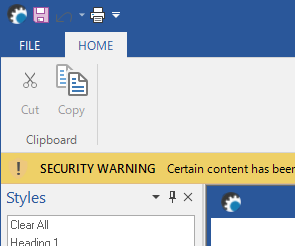
If I had used xaml instead of svg, there would have been no problem. Could it be a bug in svg?
 |
||
|
||
|
hiro-ta
Groupie
Joined: 11 July 2013 Status: Offline Points: 75 |
Post Options
Thanks(0)
Quote Reply
Posted: 12 May 2025 at 11:15pm |
|
|
PS Large icons are commented out as follows. nWidth = XTP_DPI_X(32); //m_ImgMgrVector.SetVectorIcon(type, IDR_XAML_LARGE_ICON_DISABLED_CLIPBOARD_CUT, ID_EDIT_CUT, // nWidth, xtpImageDisabled); //m_ImgMgrVector.SetVectorIcon(type, IDR_XAML_LARGE_ICON_DISABLED_CLIPBOARD_COPY, ID_EDIT_COPY, // nWidth, xtpImageDisabled); |
||
|
||
|
Post Reply
|
|
 Tweet
Tweet
|
| Forum Jump | Forum Permissions You cannot post new topics in this forum You cannot reply to topics in this forum You cannot delete your posts in this forum You cannot edit your posts in this forum You cannot create polls in this forum You cannot vote in polls in this forum |


 Topic Options