
|
How to change color of the docking pane caption? |
Post Reply 
|
| Author | |
g_j_a_i_n 
Groupie 

Joined: 27 August 2005 Status: Offline Points: 98 |
 Post Options Post Options
 Thanks(0) Thanks(0)
 Quote Reply Quote Reply
 Topic: How to change color of the docking pane caption? Topic: How to change color of the docking pane caption?Posted: 19 hours 45 minutes ago at 11:26pm |
|
Hello, Can you please tell me how to change the color of docking pane's caption. I want to change the blue color to something else. I tried PaneManager->GetPaintManager()->m_clrActiveCaption. But the color remains blue. 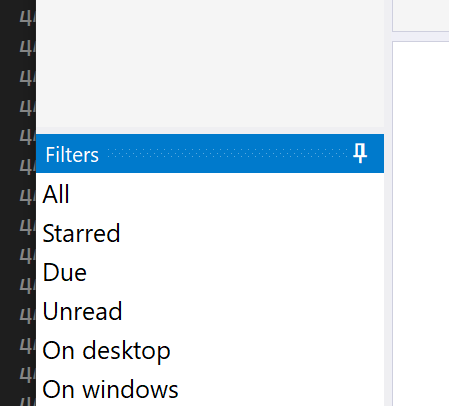 Regards, Gautam Jain |
|
 |
|
|
cpede
Senior Member 
Joined: 13 August 2004 Location: Denmark Status: Offline Points: 684 |
Post Options
Thanks(0)
Quote Reply
Posted: 8 hours 46 minutes ago at 10:25am |
|
I'm doing that through the styles ini file in section
E.g.
|
|
|
Product: Xtreme ToolkitPro (24.0.0)
Platform: Windows 10 (x64) Language: Visual Studio 2017 (C++) |
|
|
|
|
Post Reply
|
|
 Tweet
Tweet
|
| Forum Jump | Forum Permissions You cannot post new topics in this forum You cannot reply to topics in this forum You cannot delete your posts in this forum You cannot edit your posts in this forum You cannot create polls in this forum You cannot vote in polls in this forum |


 Topic Options