
|
Backstage pages not showing correctly in v24.3 |
Post Reply 
|
| Author | |
Harm Bakker 
Groupie 

Joined: 17 June 2008 Location: Netherlands Status: Offline Points: 19 |
 Post Options Post Options
 Thanks(0) Thanks(0)
 Quote Reply Quote Reply
 Topic: Backstage pages not showing correctly in v24.3 Topic: Backstage pages not showing correctly in v24.3Posted: 14 January 2026 at 6:02am |
|
Hi there,
we are in the process of upgrading our CJ XTToolkitPro version, we're moving from version 18.5 to version 24.3. We want to start using the Windows 11 styling in our application. Yet, when we use the xtpThemeNativeWindows11 and xtpPaneThemeNativeWindows11, the Backstage pages in our app look weird: 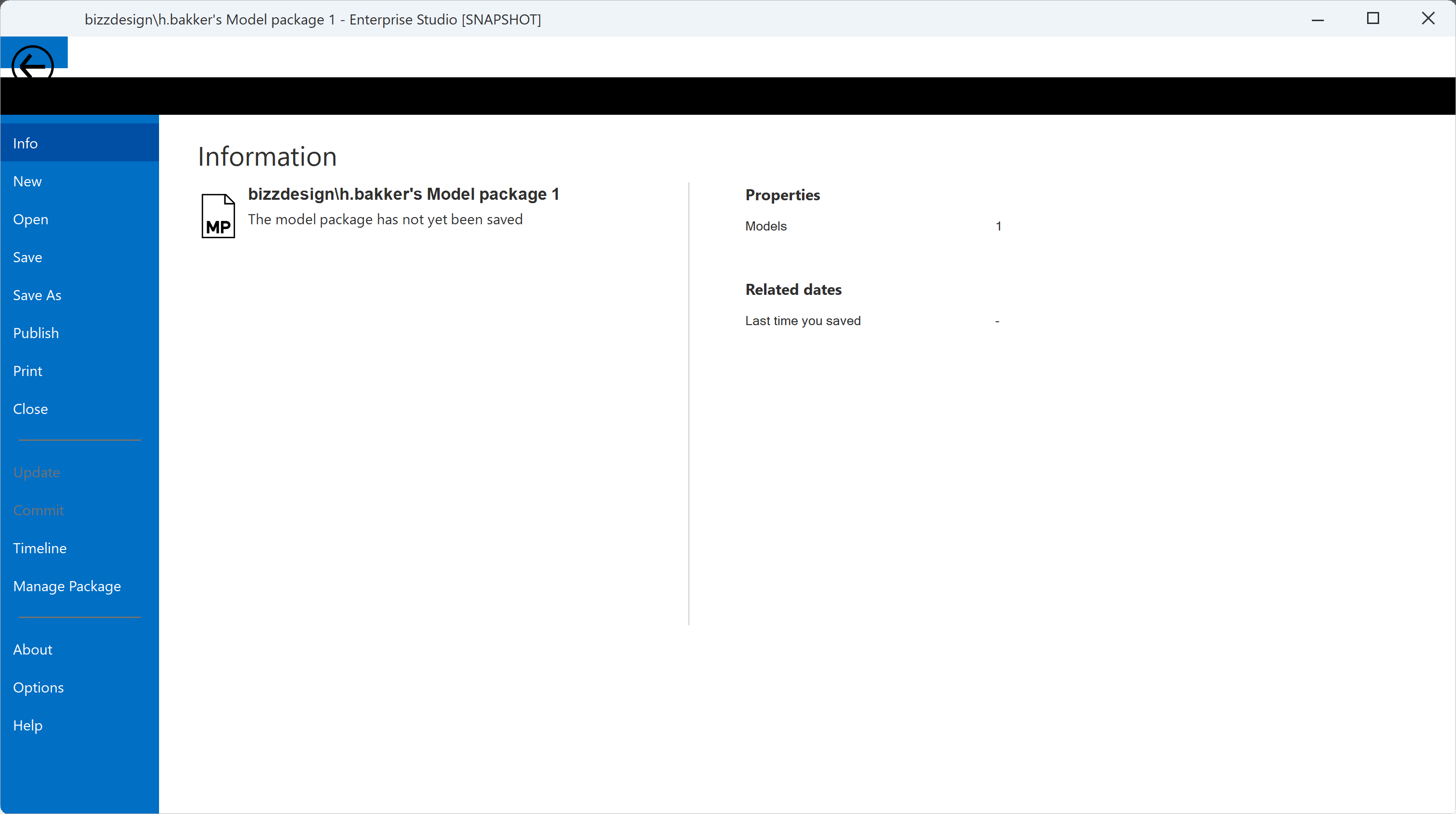 We have based our code on the CJ RibbonSample project, but when I look at that sample project now in the library code, it seems that backstage pages are not used in conjunction with xtpThemeNativeWindows11. Is this intentional, and what should we do to get around this problem? Thanks for any clues or solutions to this, kind regards,
|
|
 |
|
|
Harm Bakker
Groupie
Joined: 17 June 2008 Location: Netherlands Status: Offline Points: 19 |
Post Options
Thanks(0)
Quote Reply
Posted: 2 hours 33 minutes ago at 5:00pm |
|
I've solved this 'problem', it is partly in our own code:
A couple of years ago, we had made our subclass of CXTPRibbonBackstageView, in which we create our RibbonBackStage. And in our own class, we had a sort of copy of the CreateBackstageView method. This method in CXTPRibbonBackstageView has had some adaptations in the course of new releases of the library, esp. for the new Windows10 and Windows11 themes. I have incorporated these relevant changes to our cloned code, solving part of the visual problems. One problem in the CXTPRibbonBackstageView remains though: there is a constant value in the .cpp file: int gNewBacksategeSysButtonTop = 16; (Please note the spelling error is as it appears in the XTP toolkit code.) This does not display correctly when the paintTheme == xtpThemeNativeWindows10 or paintTheme == xtpThemeNativeWindows10: in those cases the value gNewBacksategeSysButtonTop has to be 0: static int gNewBacksategeSysButtonTop(XTPPaintTheme theme) { if (theme == xtpThemeNativeWindows10 || theme == xtpThemeNativeWindows11) { return 0; } else { return 16; } } |
|
|
|
|
Post Reply
|
|
 Tweet
Tweet
|
| Forum Jump | Forum Permissions You cannot post new topics in this forum You cannot reply to topics in this forum You cannot delete your posts in this forum You cannot edit your posts in this forum You cannot create polls in this forum You cannot vote in polls in this forum |


 Topic Options