Backstage pages not showing correctly in v24.3
Printed From: Codejock Forums
Category: Codejock Products
Forum Name: Toolkit Pro
Forum Description: Topics Related to Codejock Toolkit Pro
URL: http://forum.codejock.com/forum_posts.asp?TID=24620
Printed Date: 27 October 2026 at 7:27am
Software Version: Web Wiz Forums 12.04 - http://www.webwizforums.com
Topic: Backstage pages not showing correctly in v24.3
Posted By: Harm Bakker
Subject: Backstage pages not showing correctly in v24.3
Date Posted: 14 January 2026 at 6:02am
|
Hi there, we are in the process of upgrading our CJ XTToolkitPro version, we're moving from version 18.5 to version 24.3. We want to start using the Windows 11 styling in our application. Yet, when we use the xtpThemeNativeWindows11 and xtpPaneThemeNativeWindows11, the Backstage pages in our app look weird: 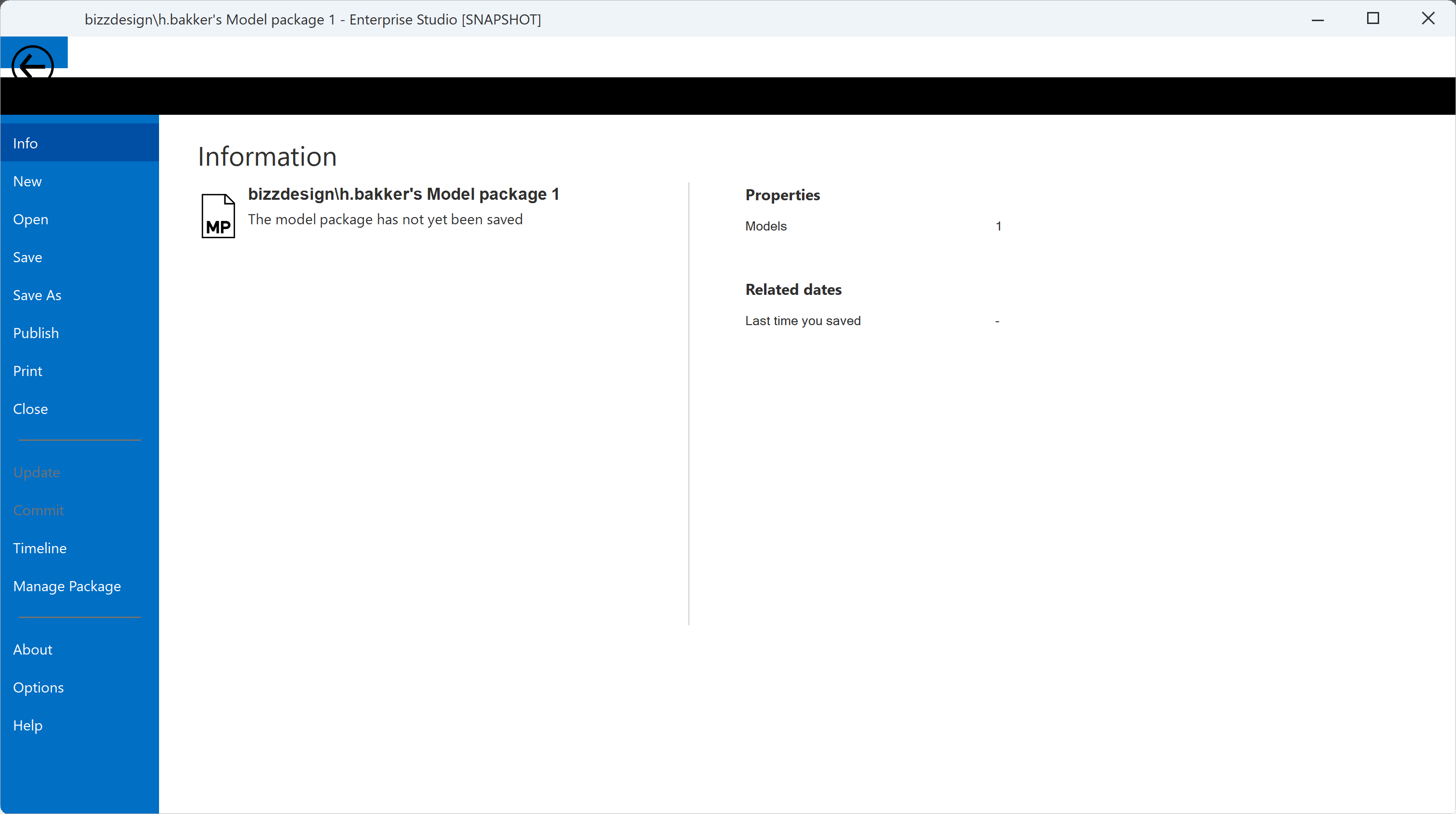 We have based our code on the CJ RibbonSample project, but when I look at that sample project now in the library code, it seems that backstage pages are not used in conjunction with xtpThemeNativeWindows11. Is this intentional, and what should we do to get around this problem? Thanks for any clues or solutions to this, kind regards,
|
Replies:
Posted By: Harm Bakker
Date Posted: 25 January 2026 at 5:00pm
|
I've solved this 'problem', it is partly in our own code: A couple of years ago, we had made our subclass of CXTPRibbonBackstageView, in which we create our RibbonBackStage. And in our own class, we had a sort of copy of the CreateBackstageView method. This method in CXTPRibbonBackstageView has had some adaptations in the course of new releases of the library, esp. for the new Windows10 and Windows11 themes. I have incorporated these relevant changes to our cloned code, solving part of the visual problems. One problem in the CXTPRibbonBackstageView remains though: there is a constant value in the .cpp file: int gNewBacksategeSysButtonTop = 16; (Please note the spelling error is as it appears in the XTP toolkit code.) This does not display correctly when the paintTheme == xtpThemeNativeWindows10 or paintTheme == xtpThemeNativeWindows10: in those cases the value gNewBacksategeSysButtonTop has to be 0: static int gNewBacksategeSysButtonTop(XTPPaintTheme theme) { if (theme == xtpThemeNativeWindows10 || theme == xtpThemeNativeWindows11) { return 0; } else { return 16; } } |
Posted By: agontarenko
Date Posted: 28 January 2026 at 5:08am
|
Hello, Thank you for finding the spelling error. It has been fixed. As
for color: me collegue added new future for Windows 11 theme. See
please attached screenshot - may be this is resolve you color problem. Regards, Artem Gontarenko 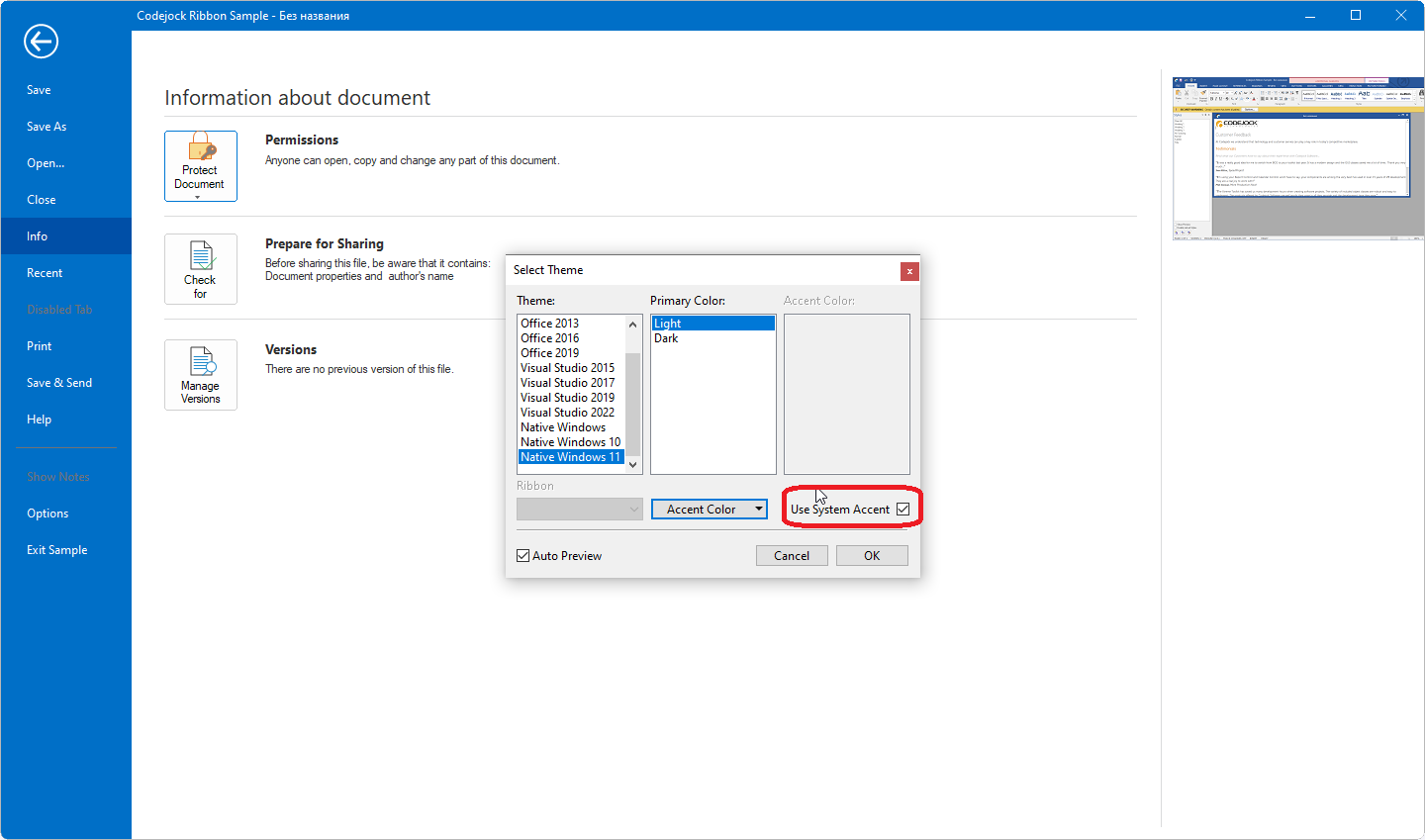 |
Posted By: Harm Bakker
Date Posted: 28 January 2026 at 5:52am
|
Hello Artem, thanks for replying, greatly appreciated! The Use System Accent option only influences the color of various items, but does not change any layouting. So, as far as I could see, I really need that specific piece of code (see above) to position the Backstage Back button correctly. Kind regards, Harm Bakker
|