
|
Where do you get the computer language settings? |
Post Reply 
|
| Author | |
Zach 
Groupie 
Joined: 19 July 2006 Status: Offline Points: 62 |
 Post Options Post Options
 Thanks(0) Thanks(0)
 Quote Reply Quote Reply
 Topic: Where do you get the computer language settings? Topic: Where do you get the computer language settings?Posted: 09 May 2007 at 1:24pm |
|
This is a question specifically directed towards the codejock controls.
I have been curious for a long time.... (like a year :) ) ... where you are pulling what language would be my native language from?
Reason I ask is simple... I am tired of speaking Polish
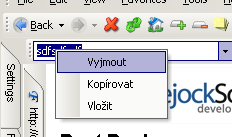
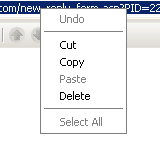
 ... cause ... I really dont speak polish... and both Codejock and Wordpad think I do ... and damn if I can figure out where just those two things are getting this idea. ... cause ... I really dont speak polish... and both Codejock and Wordpad think I do ... and damn if I can figure out where just those two things are getting this idea.Only place I see it is in context menus.... driving me nuts... though... give me another year and I think I might have copy, cut, and paste down in Polish...
(obviously this is "my" issue... just wondering if you can shed some light on to what I need to fix)
|
|
 |
|
|
SuperMario
Senior Member 

Joined: 14 February 2004 Status: Offline Points: 18057 |
Post Options
Thanks(0)
Quote Reply
Posted: 09 May 2007 at 2:09pm |
|
I suggest learning to speak polish
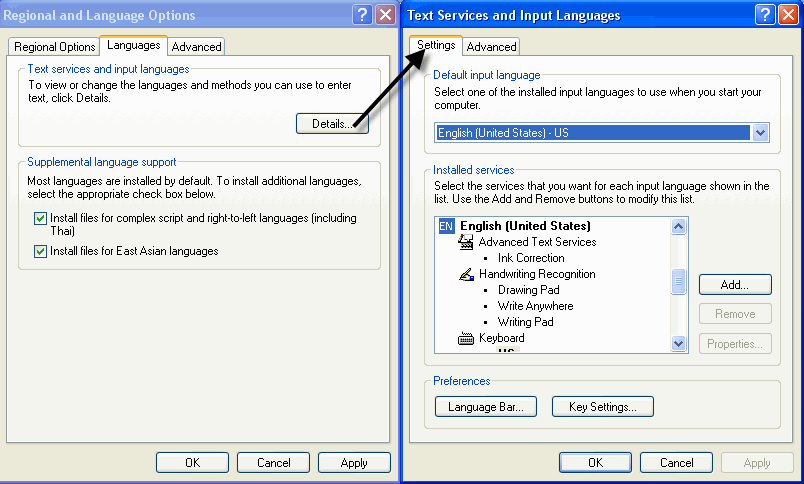
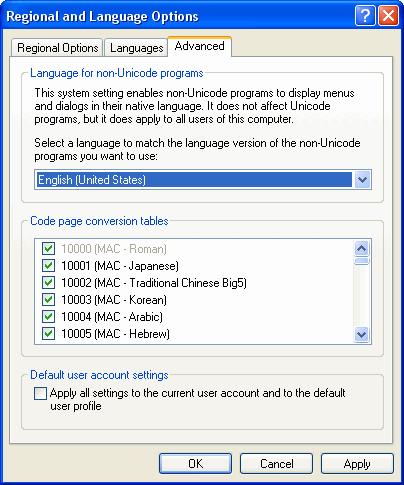
 Or you can try to see if polish is set under one of the "Regional and Language Settings" in your control panel. Or you can try to see if polish is set under one of the "Regional and Language Settings" in your control panel.
|
|
|
|
|
SuperMario
Senior Member
Joined: 14 February 2004 Status: Offline Points: 18057 |
Post Options
Thanks(0)
Quote Reply
Posted: 09 May 2007 at 2:54pm |
 |
|
|
|
|
SuperMario
Senior Member
Joined: 14 February 2004 Status: Offline Points: 18057 |
Post Options
Thanks(0)
Quote Reply
Posted: 09 May 2007 at 2:56pm |
 |
|
|
|
|
SuperMario
Senior Member
Joined: 14 February 2004 Status: Offline Points: 18057 |
Post Options
Thanks(0)
Quote Reply
Posted: 09 May 2007 at 2:56pm |
|
try checking both settings that the pictures show.
|
|
|
|
|
Zach
Groupie
Joined: 19 July 2006 Status: Offline Points: 62 |
Post Options
Thanks(0)
Quote Reply
Posted: 10 May 2007 at 2:22pm |
|
Just fyi... the language might be Portuguese ... starts with a P :).. one of those two....
Played with these two settings six months ago....
no dice
<img src='http://sportsforum.ws/imagehosting/1464363e1cceb8.png'><img src='http://sportsforum.ws/imagehosting/1464363e236438.png'>
Just so ya know exactly what I am trying to locate....
<img src='http://sportsforum.ws/imagehosting/1464363e1c8875.png'><img src='http://sportsforum.ws/imagehosting/1464363e1caf8a.png'>
|
|
|
|
|
Zach
Groupie
Joined: 19 July 2006 Status: Offline Points: 62 |
Post Options
Thanks(0)
Quote Reply
Posted: 10 May 2007 at 2:25pm |
    |
|
|
|
|
Oleg
Senior Member
Joined: 21 May 2003 Location: United States Status: Offline Points: 11234 |
Post Options
Thanks(0)
Quote Reply
Posted: 10 May 2007 at 4:03pm |
|
Hi,
I sure you installed some application that replaced c:\WINDOWS\system32\mfc42.dll file. Out Cut/Copy strings go from this file. Think it was replaced.
|
|
|
Oleg, Support Team
CODEJOCK SOFTWARE SOLUTIONS |
|
|
|
|
Zach
Groupie
Joined: 19 July 2006 Status: Offline Points: 62 |
Post Options
Thanks(0)
Quote Reply
Posted: 11 May 2007 at 10:52pm |
|
Thanks... it actually ended up being mfc42loc.dll ..... damn I thought I had greped through all these before :( ... oh well - at least now I actually know what option I am selecting now :)
|
|
|
|
|
Post Reply
|
|
 Tweet
Tweet
|
| Forum Jump | Forum Permissions You cannot post new topics in this forum You cannot reply to topics in this forum You cannot delete your posts in this forum You cannot edit your posts in this forum You cannot create polls in this forum You cannot vote in polls in this forum |


 Topic Options