
|
EnableExplorerStyle doesn't work |
Post Reply 
|
| Author | |
Fabian 
Senior Member 

Joined: 22 November 2004 Location: Switzerland Status: Offline Points: 336 |
 Post Options Post Options
 Thanks(0) Thanks(0)
 Quote Reply Quote Reply
 Topic: EnableExplorerStyle doesn't work Topic: EnableExplorerStyle doesn't workPosted: 04 June 2011 at 2:42am |
|
Hi,
I try to use TreeView1.EnableExplorerStyle True, False on a Windows7 PC. But I never see the expected icons but only the squared +/- signs.
What do I wrong?
Thanks for help
Fabian
|
|
|
Product: Xtreme SuitePro (ActiveX) version 16.2.3
Platform: Windows 7 (32bit) Language: Visual Basic 6.0 / SP6 |
|
 |
|
|
Oleg
Senior Member
Joined: 21 May 2003 Location: United States Status: Offline Points: 11234 |
Post Options
Thanks(0)
Quote Reply
Posted: 06 June 2011 at 6:53am |
|
Hi,
You need add manifest and run application as exe outside IDE.
|
|
|
Oleg, Support Team
CODEJOCK SOFTWARE SOLUTIONS |
|
|
|
|
Fabian
Senior Member
Joined: 22 November 2004 Location: Switzerland Status: Offline Points: 336 |
Post Options
Thanks(0)
Quote Reply
Posted: 07 June 2011 at 1:56am |
|
Hi Oleg,
On my site it doesn't work as expected. Here is my TreeView initialization:
Public Sub CJInitTreeView(TreeView1 As TreeView)
TreeView1.Nodes.Clear TreeView1.Appearance = xtpAppearanceResource TreeView1.UseVisualStyle = True TreeView1.ShowLines = xtpTreeViewShowLinesAtRoot TreeView1.Indentation = 0 TreeView1.SingleSel = False TreeView1.ShowBorder = False TreeView1.HideSelection = True TreeView1.SetIconSize 16, 16 TreeView1.EnableExplorerStyle True, True TreeView1.LabelEdit = xtpTreeViewLabelManual End Sub The result (compiled incl. .Manifest):
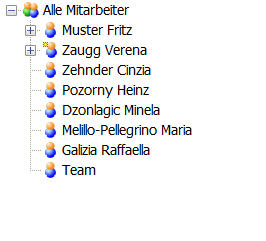 Explorer on the same PC:
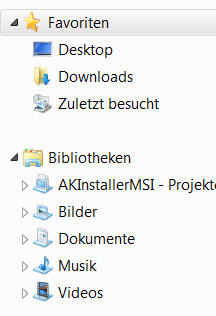 |
|
|
Product: Xtreme SuitePro (ActiveX) version 16.2.3
Platform: Windows 7 (32bit) Language: Visual Basic 6.0 / SP6 |
|
|
|
|
younicke
Senior Member

Joined: 11 March 2005 Status: Offline Points: 107 |
Post Options
Thanks(0)
Quote Reply
Posted: 07 June 2011 at 3:01am |
|
works ok here.. maybe something is wrong with your manifest..
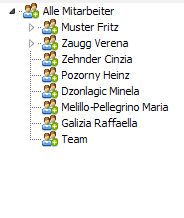 |
|
|
|
|
Fabian
Senior Member
Joined: 22 November 2004 Location: Switzerland Status: Offline Points: 336 |
Post Options
Thanks(0)
Quote Reply
Posted: 07 June 2011 at 6:31am |
|
Hi younicke
Thanks a lot for your test. Can you please show me your code and your manifest?
Regards
Fabian
|
|
|
Product: Xtreme SuitePro (ActiveX) version 16.2.3
Platform: Windows 7 (32bit) Language: Visual Basic 6.0 / SP6 |
|
|
|
|
younicke
Senior Member
Joined: 11 March 2005 Status: Offline Points: 107 |
Post Options
Thanks(0)
Quote Reply
Posted: 07 June 2011 at 5:54pm |
|
|
|
Post Reply
|
|
 Tweet
Tweet
|
| Forum Jump | Forum Permissions You cannot post new topics in this forum You cannot reply to topics in this forum You cannot delete your posts in this forum You cannot edit your posts in this forum You cannot create polls in this forum You cannot vote in polls in this forum |


 Topic Options