dpi-Bug: Ribbonbar doesnt scale up some Icons
Printed From: Codejock Forums
Category: Codejock Products
Forum Name: Command Bars
Forum Description: Topics Related to Codejock Command Bars
URL: https://forum.codejock.com/forum_posts.asp?TID=24702
Printed Date: 10 November 2026 at 9:09am
Software Version: Web Wiz Forums 12.08 - https://www.webwizforums.com
Topic: dpi-Bug: Ribbonbar doesnt scale up some Icons
Posted By: lsswiss
Subject: dpi-Bug: Ribbonbar doesnt scale up some Icons
Date Posted: 04 November 2026 at 1:56pm
|
Bug: The Dropdown Button Icons in the ribbon are not scaled up to the system DPI setting, even if the process is dpiaware. See screenshot below (the icons that need a fix are marked in the screenshot with orange circles). Effect of the bug: The icons appear on high screen resolutions smaller then they should be. The higher the screen resolution and the higher the dpi setting in Windows is, the smaller the icons appear. Tested with the VB6 ribbon sample (see attached ZIP file). Set the System DPI to a high value to see the effect and run the uploaded sample which turns on DPIawareness in-process with Win32 api (SetProcessDpiAwareness): uploads/9748/RibbonSample-In-Process-DPIAwareness.zip" rel="nofollow - uploads/9748/RibbonSample-In-Process-DPIAwareness.zip Note: The effect is bigger on high dpi settings and big computer screens. On small monitors the effect is not recognizeable. Importance: As Screen resolutions and screens become higher in the market, this Problem needs a fix in the 2026 version. 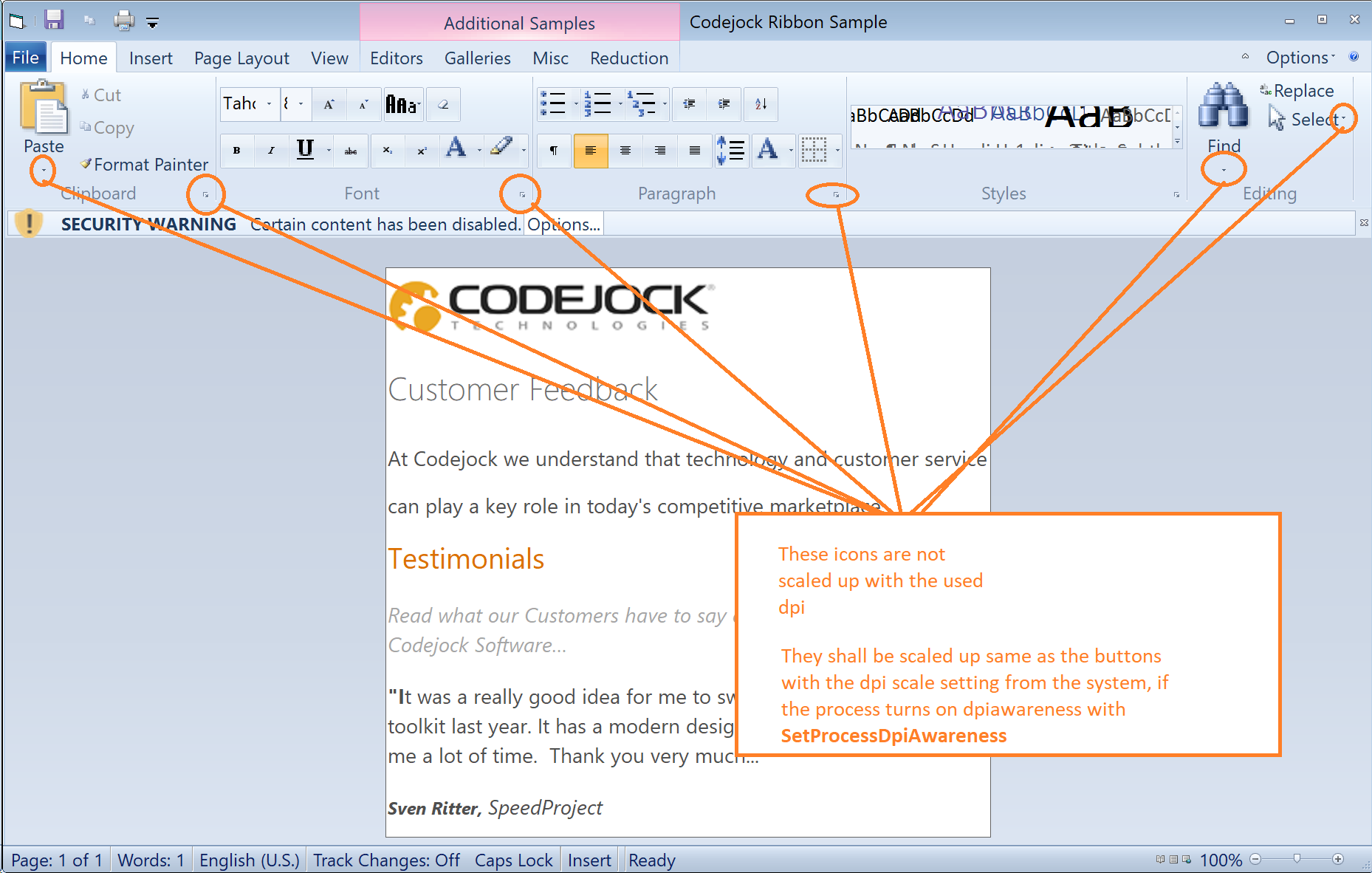
Thank you so much for your efforts and keep up the good work dear Codejock Team <3 |
Replies:
Posted By: lsswiss
Date Posted: 04 November 2026 at 2:27pm
|
Tested this in the v26-beta, the bug still exists, see the screenshot here: https://bit.ly/4z0gRGu" rel="nofollow - https://bit.ly/4z0gRGu
|