
|
DPI Miscalculation: Controls update @hide+unhide |
Post Reply 
|
| Author | |
lsswiss 
Groupie 
Joined: 18 hours 29 minutes ago Status: Offline Points: 11 |
 Post Options  Thanks(0)  Quote Reply  Topic: DPI Miscalculation: Controls update @hide+unhide Posted: 14 hours 44 minutes ago at 4:02am |
|
Since you are developing Version 26, here is a real problem in 24.3 and 26 Beta (yes it still exists in Beta, I tested it):
If you run VB6 under a dpiAware-Manifest with the dpi-Setting set to true, then your process should run natively dpi aware. On 100%, 150%, 200% everything works fine and the controls are well placed. But if you go with 225% or 175% DPI setting in Windows, then many Codejock Suite controls are not well placed, until you hide them and show them again. Before hide/unhide the sample looks like this: 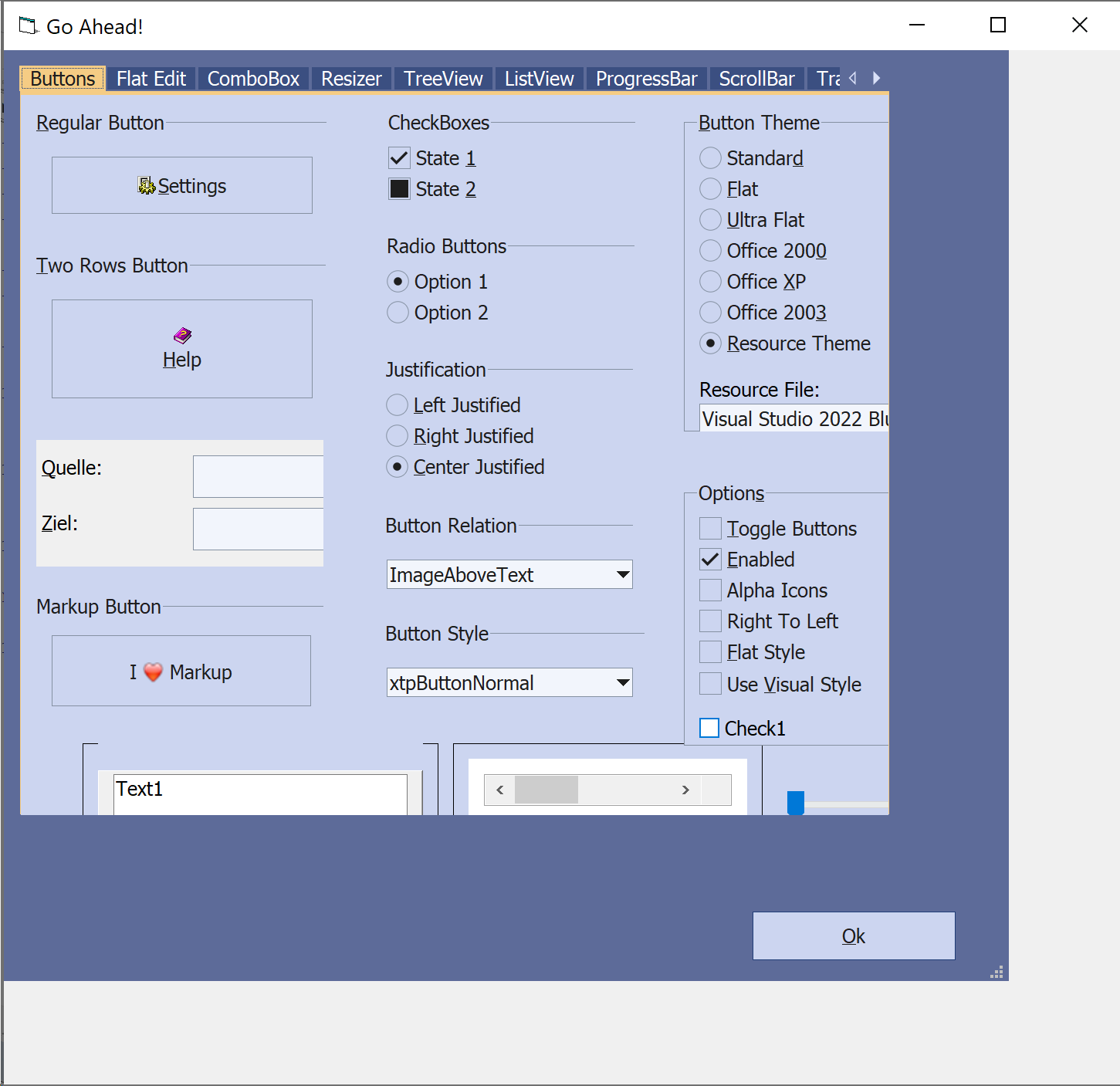 Note, how many controls are not within right borders. After hide and unhide it looks like this, which is right: 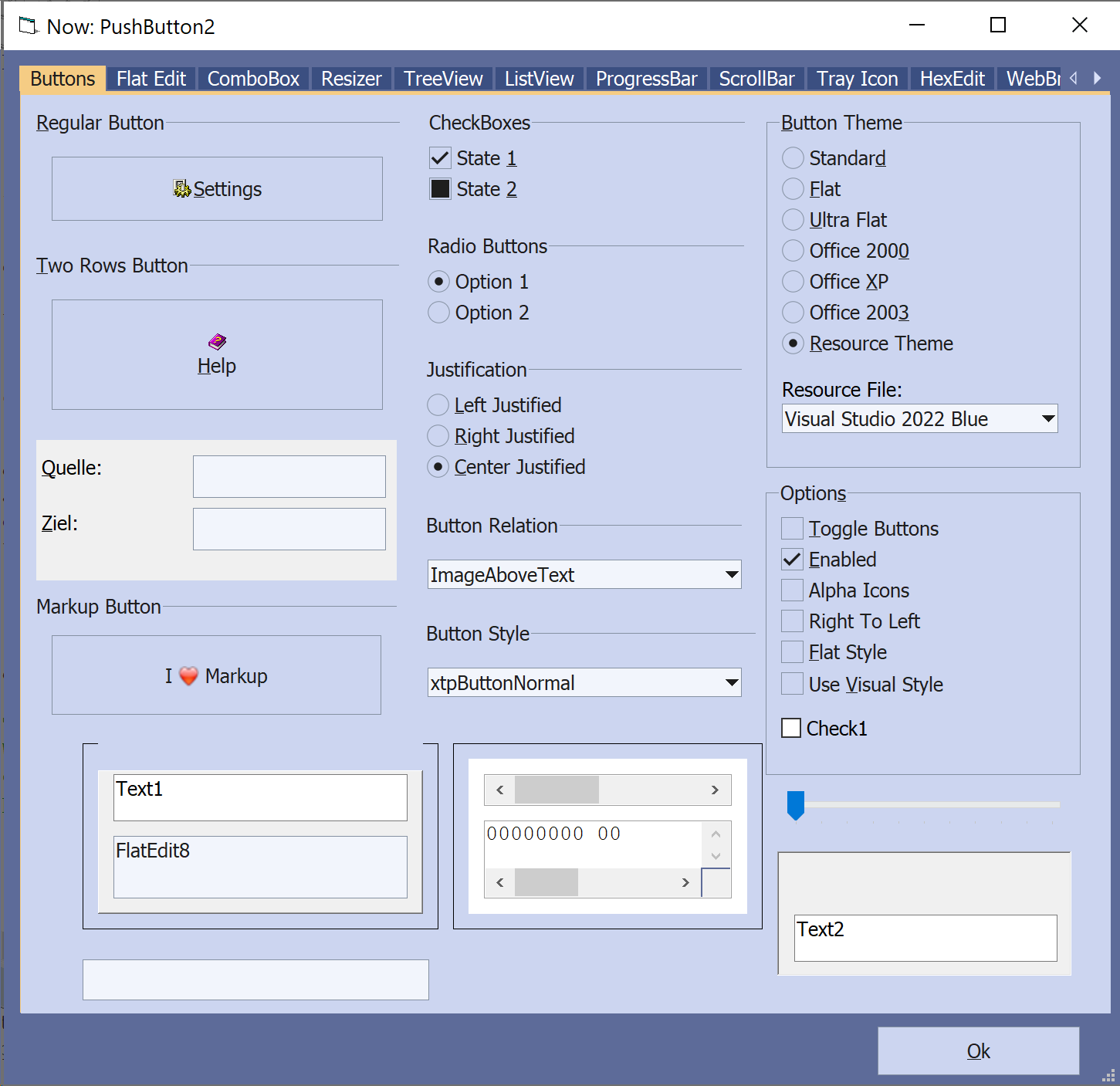 The Line that is necessary in the vb6.exe.manifest to see this behaviour, is: <dpiAware xmlns="http://schemas.microsoft.com/SMI/2005/WindowsSettings">true/pm</dpiAware> Test it with the SuiteControls sample under the path: C:\Program Files (x86)\Codejock Software\ActiveX\Xtreme SuitePro ActiveX v24.3.0\Samples\Controls\VB\SuiteControls Just add the following lines to the example to get the proof how it updates some controls when you set visible first to false and then to true again: Private Sub Form_Activate() On Error Resume Next Dim ctrl As VB.Control Dim oldTimer As Single 'Wait 5 seconds to see the before: oldTimer = Timer Me.Caption = "Go Ahead!" Do While Timer < oldTimer + 5 DoEvents Loop For Each ctrl In Me.Controls If TypeName(ctrl) <> "Menu" Then Me.Caption = "Now: " & ctrl.Name Debug.Print "Now: " & ctrl.Name If ctrl.Name = "mnuPopup" Then Stop ctrl.Visible = False ctrl.Visible = True DoEvents 'Uncomment, if you want to slow it down a bit: 'oldTimer = Timer 'Do While Timer < oldTimer + 0.1 ' DoEvents 'Loop End If Next End Sub ----- If you want a complete manifest file that you drop to a text file at C:\Program Files (x86)\Microsoft Visual Studio\VB98\VB6.EXE.manifest, here the manifest that I used, then start VB6 again:
|
|
 |
|
|
lsswiss
Groupie
Joined: 18 hours 29 minutes ago Status: Offline Points: 11 |
Post Options
Thanks(0)
Quote Reply
Posted: 13 hours 39 minutes ago at 5:07am |
|
I have to update: with a Windows DPI setting of 100%, 150%, 250% or 300% everything works fine with Codejock Suite ActiveX Controls.
The problems appear if the Windows DPI setting has a value of like for example: - 175% - 200% - 225%
|
|
|
|
|
lsswiss
Groupie
Joined: 18 hours 29 minutes ago Status: Offline Points: 11 |
Post Options
Thanks(0)
Quote Reply
Posted: 1 hour 59 minutes ago at 4:47pm |
|
After testing this issue more deep, I come to the clue, that it might be even a Windows limitation. I say this because even the VB-internal UserControls have similar issues and are painting with wrong dimensions when DPIawareness is set from outside of the process in the Manifest file, same as here.
The solution for this problem would be to let users know that they have to turn on the DPIAwareness in Visual Basic 6 in-process, not in the manifest file (out-of-process). That can be done in the VB6 sourcecode by declaring:
And by activating the dpiawareness with: There is still a small Bug when using in-process dpiawareness in the Ribbon, which I have posted in: If Codejock could fix the other bug in V26 ("drop down icons are too small in the Ribbon on high DPI settings"), VB6 users would have a good way to come around the issue above.
|
|
|
|
|
Post Reply
|
|
| Tweet |
| Forum Jump | Forum Permissions You cannot post new topics in this forum You cannot reply to topics in this forum You cannot delete your posts in this forum You cannot edit your posts in this forum You cannot create polls in this forum You cannot vote in polls in this forum |


 Topic Options