Codejock Forums Homepage
Forum Home Forum Home > Codejock Products > Visual C++ MFC > Toolkit Pro
  New Posts New Posts RSS Feed - Codejock v26 Beta Released
  FAQ FAQ  Forum Search   Events   Register Register  Login Login

Codejock v26 Beta Released

 Post Reply Post Reply
Author
Message
astoyan View Drop Down
Admin Group
Admin Group
Avatar

Joined: 24 August 2013
Status: Offline
Points: 340
Post Options Post Options   Thanks (0) Thanks(0)   Quote astoyan Quote  Post ReplyReply Direct Link To This Post Topic: Codejock v26 Beta Released
    Posted: 4 hours 3 minutes ago at 1:07pm

Codejock v26 Beta Released — Toolkit Pro & Suite Pro

A fresh look. More possibilities.

We're excited to announce the release of Codejock v26 Beta for Visual C++ MFC and ActiveX COM. This release modernizes your Windows interface, brings deeper insight to your charts, and delivers major library improvements across the board.

Highlights:
  • New themes
  • New charting capabilities
  • Major library improvements


01 / A Modern Windows Experience

A familiar workspace. A distinctly modern finish.

New Visual Studio 2026 and Office 2024 themes bring a coordinated look to application frames, ribbons, menus, docking panes, and applicable controls.

  • 13 Visual Studio 2026 themes, including 7 light and 6 dark variants
  • 28 Office 2024 theme combinations across 4 styles and 7 accent colors
  • Dark + Light modernized appearance with consistent styling across Toolkit Pro and Suite Pro

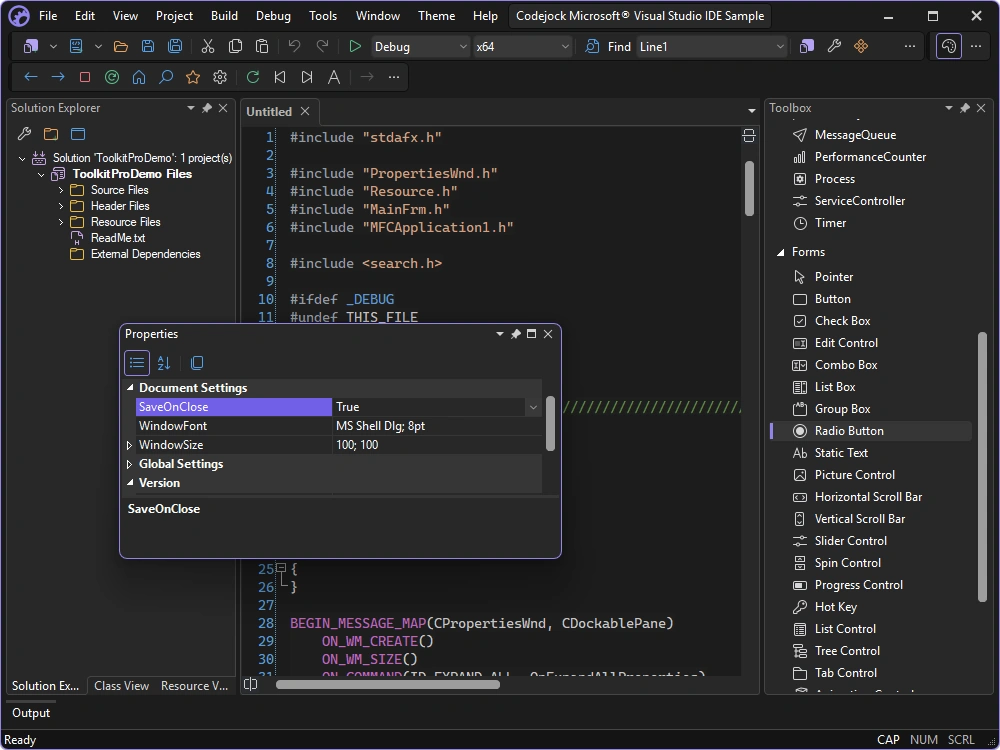
Visual Studio 2026 — Explore 13 theme variants including Juicy Plum, Dark, Cool Breeze, Icy Mint, Moonlight Glow, Spicy Red, Mango Paradise, Mystical Forest, Cool Slate, Bubblegum, Light, Sunny Day, and Silky Pink.


Visual Studio 2026 theme

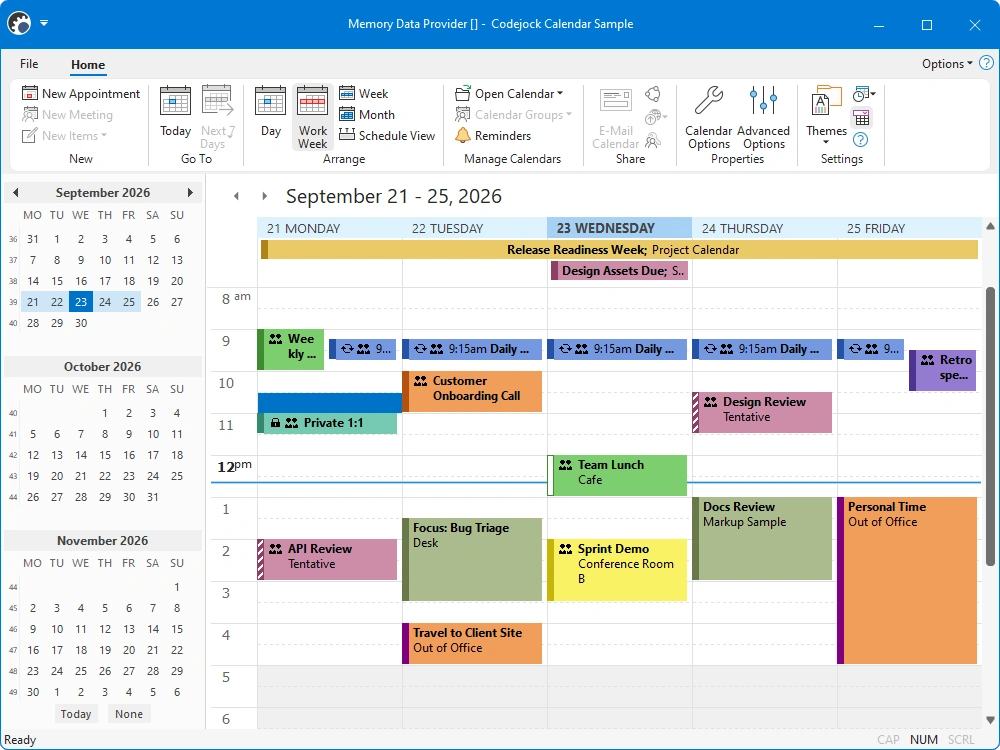
Office 2024 — Explore Black, White, Colorful, and Dark Gray styles with Access, Excel, OneNote, Outlook, PowerPoint, Publisher, and Word accent colors.


Office 2024 colorful theme

Also in v26: Office 2019 theme support, refined Windows 11 colors, DWM-managed frame and popup corners, and improved theme switching. Availability varies by control and platform.


02 / Charting That Goes Further

Turn your data into a clearer picture.

Build richer analysis directly into your application with computed series, financial functions, and synchronized data.

  • Financial indicators, ready to use. SMA, EMA, WMA, RSI, Shift, and Bollinger Bands join the built-in series function library.
  • Calculations that work together. Link point collections and chain computations using another series' computed values.
  • Smoother interaction, more flexible layouts. Two-finger panning, smooth pinch zoom, and configurable diagram size ratios make multi-chart views easier to navigate. Series processing is optimized for frequent updates and large data sets.
  • Your logic, your visualization. Override series computation with custom functions and control how point values are mapped.


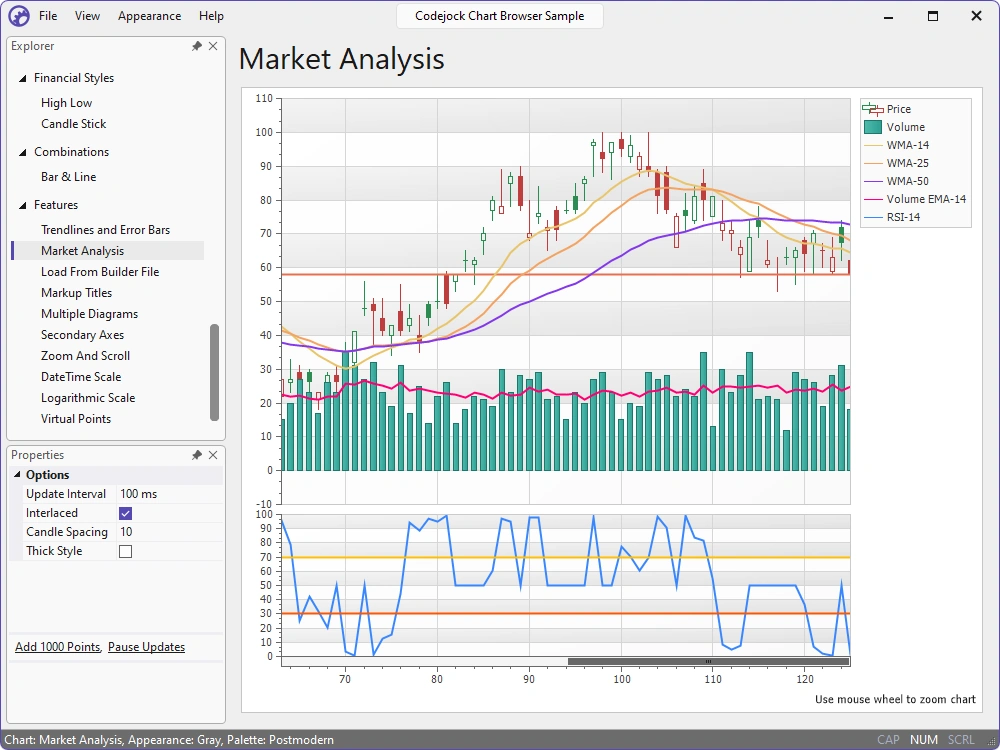
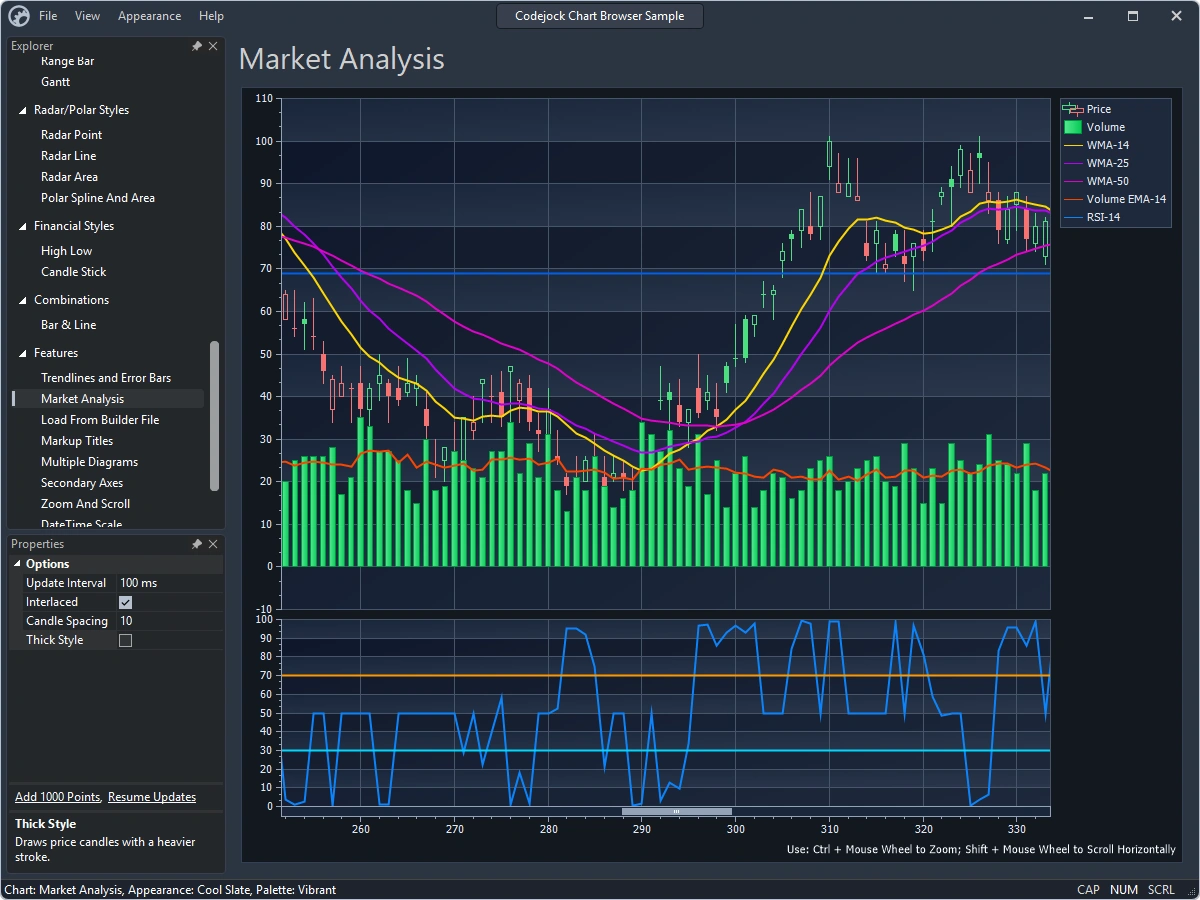
The Market Analysis sample combines price, volume, moving averages, and an RSI diagram in one view

New in MFC & ActiveX: Bring a new dimension to your data.

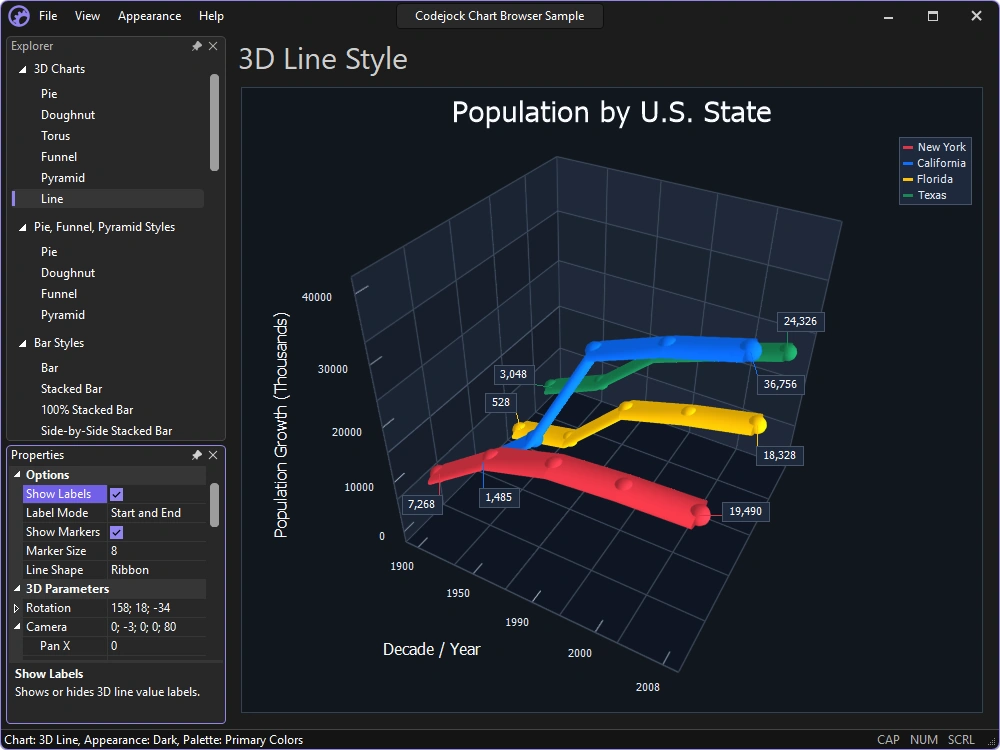
New 3D Line charts support tube and ribbon series shapes, configurable depth, markers, and point-label display modes.

  • Adjust the view with camera focal-point panning and shared zoom helpers.
  • Use appearance-driven axes, grids, lighting, and materials.
  • Render translucent series with new 3D Line transparency.


The Chart Browser sample shows multiple ribbon-shaped series, markers, and point labels in a 3D diagram. 


03 / Workspaces Built for Your Application

Give your documents a workspace of their own.

Build document editing into your application with reusable themed workspaces, rich-text views, and document rulers.

  • Start with reusable views. New workspace and Rich Edit classes support RTF loading, page sizing, and coordinated scrolling.
  • Keep editing tools in step. DPI-aware rulers integrate with the document workspace.
  • Carry the theme through. Framed MDI child windows can inherit their parent Command Bars frame theme.


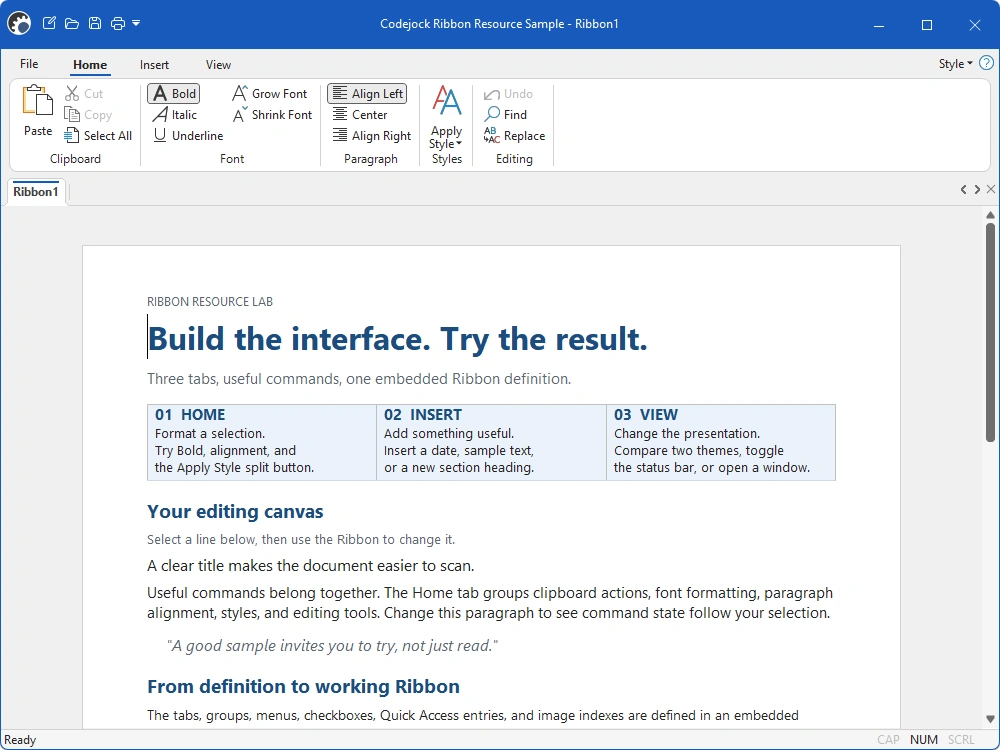
The RibbonResource sample combines a resource-built Ribbon with an editable rich-text document.

Modern docking. Windows finishing touches.

Bring tool windows, application frames, and popup menus into the same visual language.

  • Clearer docking feedback. Modern Visual Studio-style docking guides and push-pin resources help users arrange their workspace.
  • Consistent floating windows. Themed floating Docking Pane frames are enabled by default, with improved theme propagation to toolbars and child controls.
  • Native frame details. DWM integration improves rounded frames and popup menus where supported, with configurable shadows and fallback behavior.
  • Better across monitors. Detached toolbars and floating panes recover when their monitor is disconnected.


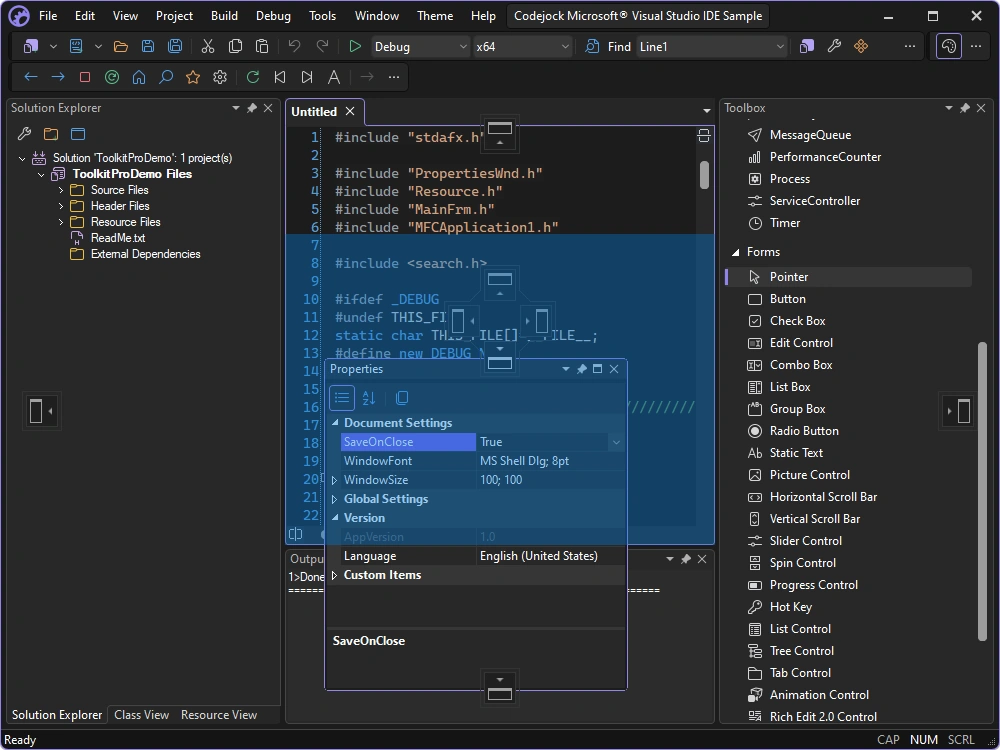
The Visual Studio-style sample shows a floating Properties pane, docking guides, and a placement preview.


04 / More in v26

Modern tools. Smoother development.

Expanded controls, improved localization, and updated development tools help you move existing applications forward.

FeatureDetails
More control over controlsNew MFC static, slider, and resizable-dialog classes expand theming and layout. ActiveX adds shell controls and edit cue text.
Localization, reworkedReworked language support, new locale-management APIs, and an ActiveX resource-file locale setting give you more control over translations.
Move existing projects forwardVisual Studio 2026 wizard and deployment support simplifies setup. The MFC VS6 Project Converter adds x64 configurations and C++23 support while preserving more project settings.
More flexible diagramsPlace captions above shapes and connect at rectangle side centers. New and expanded Flow Graph samples cover UML, network, and application architecture diagrams.
Gauges that blend inConfigurable background colors and transparent child gauges help dashboards blend into your interface, with dedicated ActiveX properties.
Better starting pointsUpdated Grid, Chart Browser, Stock, and document samples demonstrate current themes and workflows. ChartBuilder adds PNG, GIF, JPEG, and BMP export.

More improvements throughout: Calendar readability, scrolling, Ribbon repainting, and theme switching receive attention too.

We'd love to hear your feedback about this release, and we're grateful in advance for you sharing your thoughts with us.


Please refer to our release notes for this version on our website - https://codejock.com/products/releasenotes/release_notes.asp 
Back to Top
 Post Reply Post Reply

Forum Jump Forum Permissions View Drop Down

Forum Software by Web Wiz Forums® version 12.08
Copyright ©2001-2026 Web Wiz Ltd.

This page was generated in 0.375 seconds.