
|
Menu won't draw. |
Post Reply 
|
| Author | |
rdhd 
Senior Member 

Joined: 13 August 2007 Location: United States Status: Offline Points: 980 |
 Post Options Post Options
 Thanks(0) Thanks(0)
 Quote Reply Quote Reply
 Topic: Menu won't draw. Topic: Menu won't draw.Posted: 22 May 2026 at 2:50pm |
|
The menu added to a window won't draw when a skin is active. I have debugged and see CXTPSkinManagerSchema::CalcFrameBorders is called but it isn't calculating any width. All the relevant menu methods seem to get called. The class being used for the window is CXTPSkinObjectApplicationFrame. Here is the minimum code: static const TCHAR s_szAddInManagerDialogClass[] = TEXT("AddInManagerDialogClass"); static const TCHAR s_szAddInManagerMenuText[] = TEXT("Item 1"); static const UINT s_nAddInManagerMenuItem = 1001; HWND hDialog; WNDCLASSEX wc = { 0 }; wc.cbSize = sizeof(WNDCLASSEX); wc.lpfnWndProc = AddInManagerWndProc; wc.hInstance = GetModuleHandle(NULL); wc.lpszClassName = s_szAddInManagerDialogClass; wc.cbWndExtra = DLGWINDOWEXTRA; if (!RegisterClassEx(&wc) && GetLastError() != ERROR_CLASS_ALREADY_EXISTS) { return HRESULT_FROM_WIN32(GetLastError()); } hDialog = CreateWindowEx(WS_EX_CLIENTEDGE, s_szAddInManagerDialogClass, TEXT("Dialog with menu"), WS_OVERLAPPEDWINDOW | WS_VISIBLE, 100, 100, 500, 300, NULL, NULL, GetModuleHandle(NULL), NULL); if (!hDialog) { return HRESULT_FROM_WIN32(GetLastError()); } HMENU hMenu = ::CreateMenu(); HMENU hSubMenu = ::CreatePopupMenu(); AppendMenu(hSubMenu, MF_OWNERDRAW, s_nAddInManagerMenuItem, s_szAddInManagerMenuText); AppendMenu(hMenu, MF_POPUP, (UINT_PTR)hSubMenu, TEXT("Menu")); SetMenu(hDialog, hMenu); DrawMenuBar(hDialog); If I turn off the skin (I added code to draw the menu items to make sure it wasn't a black on black issue: |
|
 |
|
|
rdhd
Senior Member
Joined: 13 August 2007 Location: United States Status: Offline Points: 980 |
Post Options
Thanks(0)
Quote Reply
Posted: 22 May 2026 at 2:52pm |
|
Sorry, ignore "I have debugged and see CXTPSkinManagerSchema::CalcFrameBorders is called but it isn't calculating any width." The width isn't being used. The system menu does draw but the menu added to the window doesn't.
|
|
|
|
|
rdhd
Senior Member
Joined: 13 August 2007 Location: United States Status: Offline Points: 980 |
Post Options
Thanks(0)
Quote Reply
Posted: 22 May 2026 at 2:53pm |
|
|
|
|
|
|
rdhd
Senior Member
Joined: 13 August 2007 Location: United States Status: Offline Points: 980 |
Post Options
Thanks(0)
Quote Reply
Posted: 22 May 2026 at 2:58pm |
|
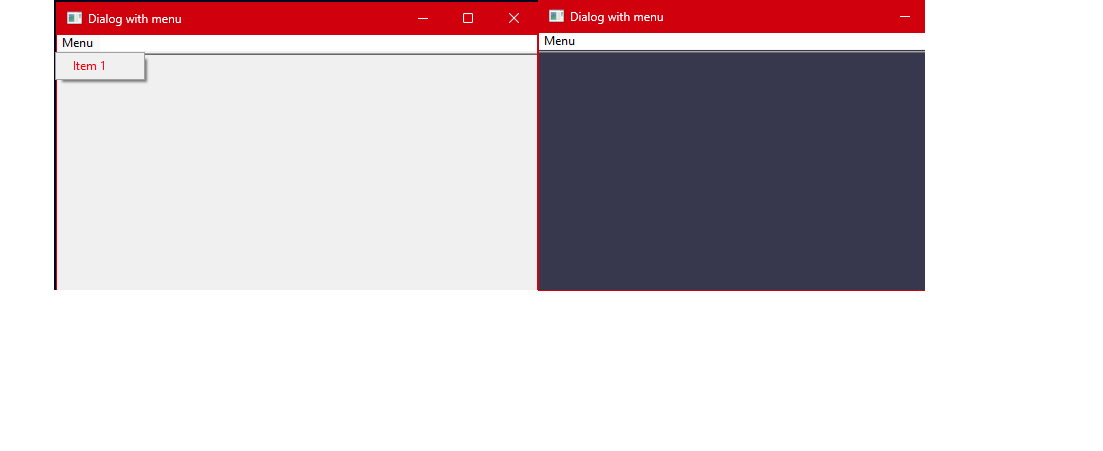
Sorry as I hack thru this website. Pasted images show up in the page but when I "Post Reply" I see nothing. Hope this shows up. Left side is what I see when clicking "Menu". Right side has the skin and nothing shows up when I click "Menu". System menu shows up just fine.
|
|
|
|
|
rdhd
Senior Member
Joined: 13 August 2007 Location: United States Status: Offline Points: 980 |
Post Options
Thanks(0)
Quote Reply
Posted: 22 May 2026 at 3:01pm |
|
Seems to be perhaps the wrong skin class? I have found that no matter where I click in the "Menu" bar area the StartMenuState function is called and the only menu it supports seems to be the system menu.
|
|
|
|
|
rdhd
Senior Member
Joined: 13 August 2007 Location: United States Status: Offline Points: 980 |
Post Options
Thanks(0)
Quote Reply
Posted: 22 May 2026 at 3:17pm |
|
Changing the window class to "#32770" didn't help. Class handler is still CXTPSkinObjectApplicationFrame. I'm beginning to think CJ skin system simply doesn't handle this OS SetMenu call and/or the creation of the menu. How about it CJ, what's my option here? I don't actually own the code that is failing whenever a skin is present. Do I have to have the actual programmers give me window class names to exclude from skinning?
|
|
|
|
|
astoyan
Admin Group 

Joined: 24 August 2013 Status: Offline Points: 338 |
Post Options
Thanks(0)
Quote Reply
Posted: 27 May 2026 at 9:57am |
|
Hello, Thank you for providing results of your deep research. It looks like there is no quick fix for this, but it's been added to our bug list with a reference to this thread. We'll have it investigated shortly after we release an update. Regards, Alexander
|
|
|
|
|
rdhd
Senior Member
Joined: 13 August 2007 Location: United States Status: Offline Points: 980 |
Post Options
Thanks(0)
Quote Reply
Posted: 28 May 2026 at 6:23pm |
|
Hi Alexander, Thanks for putting it on a list. Looks like the code is always calling GetSysMenu even when GetMenu(m_hWnd) returns the menu in question.
|
|
|
|
|
agontarenko
Moderator Group 
Joined: 25 March 2016 Status: Offline Points: 348 |
Post Options
Thanks(0)
Quote Reply
Posted: 08 June 2026 at 5:31am |
|
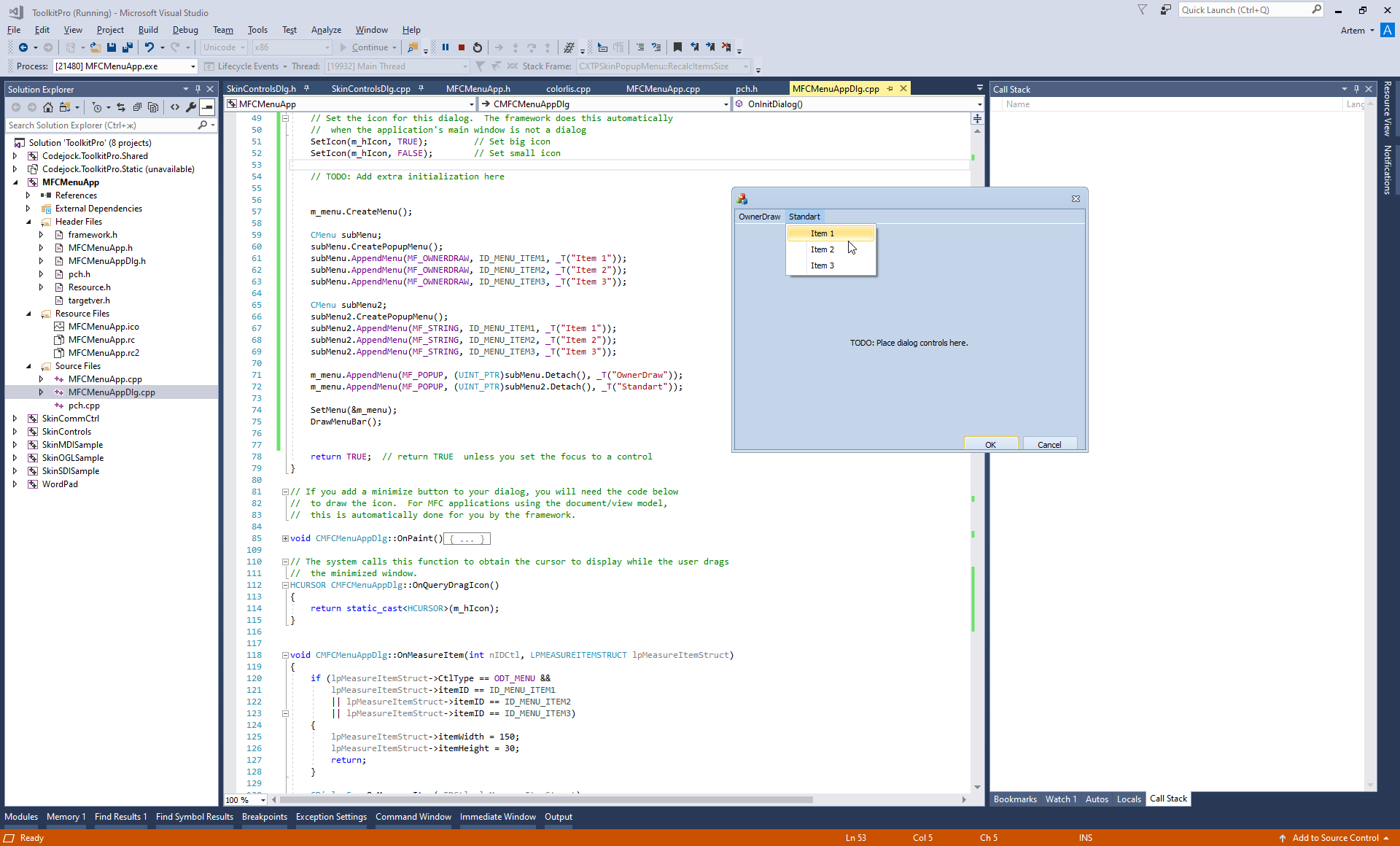
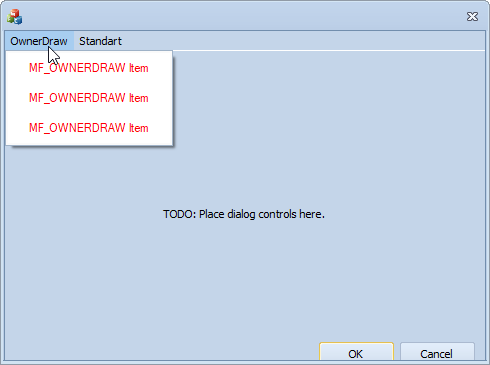
Hello, I've created test MFC project with ownerdraw menu, then add CJ skin and menu, rename CWinApp -> CXTPWinApp and all works as expected. See please my test project. Regards, Artem Gontarenko |
|
|
|
|
agontarenko
Moderator Group
Joined: 25 March 2016 Status: Offline Points: 348 |
Post Options
Thanks(0)
Quote Reply
Posted: 08 June 2026 at 5:32am |
|
|
|
|
|
agontarenko
Moderator Group
Joined: 25 March 2016 Status: Offline Points: 348 |
Post Options
Thanks(0)
Quote Reply
Posted: 08 June 2026 at 5:33am |
|
|
|
|
|
agontarenko
Moderator Group
Joined: 25 March 2016 Status: Offline Points: 348 |
Post Options
Thanks(0)
Quote Reply
Posted: 08 June 2026 at 7:30am |
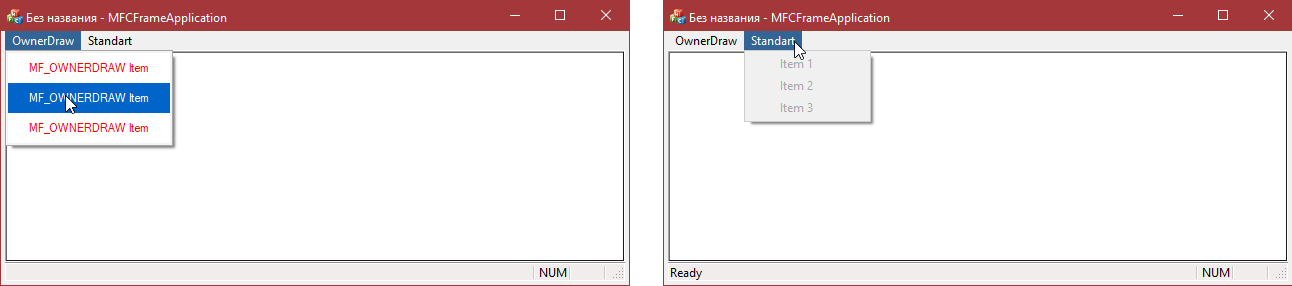 This is CFrameWnd base window (SDI) test. Regards, Artem Gontarenko
|
|
|
|
|
rdhd
Senior Member
Joined: 13 August 2007 Location: United States Status: Offline Points: 980 |
Post Options
Thanks(0)
Quote Reply
Posted: 08 June 2026 at 9:57am |
|
What I have isn't an MFC app though our app is based on MFC. The code I dropped is just "classic"/Petzold sort of programming.
|
|
|
|
|
agontarenko
Moderator Group
Joined: 25 March 2016 Status: Offline Points: 348 |
Post Options
Thanks(0)
Quote Reply
Posted: 13 hours 54 minutes ago at 3:21am |
|
Hello, As I understand it, you're using a menu with the MF_OWNERDRAW flag and a skin together, and that's causing the problem. But I couldn't reproduce it. I created a similar app using MFC. We understand you don't own the code, but we need to debug it to figure out what the issue is. Can you provide example with this problem? Regards, Artem Gontarenko |
|
|
|
|
rdhd
Senior Member
Joined: 13 August 2007 Location: United States Status: Offline Points: 980 |
Post Options
Thanks(0)
Quote Reply
Posted: 8 hours 45 minutes ago at 8:30am |
|
Let me put one together as I just went into our app and hijacked a command where I put the code I posted here. And, owner draw doesn't matter. I added owner draw to see if the issue was with the background and text colors. But, no messages to draw ever arrive.
|
|
|
|
|
rdhd
Senior Member
Joined: 13 August 2007 Location: United States Status: Offline Points: 980 |
Post Options
Thanks(0)
Quote Reply
Posted: 1 hour 54 minutes ago at 3:21pm |
|
I didn't duplicate this in the SkinMDISample. At first. But I saw and unchecked the Apply menus check box on the Skins and Themes window and the sample has problems. They are a bit different from our app in as clicking the system menu shows the app menu but the issue where the app menu shows up but doesn't work. The different behaviors turned out to me due to us using command bars. Below is code I added to use the help about command to show the problem. Ignore commented code and ignore the filtering I added just to verify it works when skinning is disabled for the window. Sorry for the big code drop but I don't see an "attach file" here. // App command to run the dialog
// NOTE: Set this to 0 to demonstrate the menu bar NOT appearing (the bug) // Set this to 1 to show the workaround (filtering the window class) #define USE_WINDOW_FILTER_WORKAROUND 0 static const TCHAR s_szAddInManagerDialogClass[] = TEXT("AddInManagerDialogClass"); static const TCHAR s_szMenuWindowClass[] = TEXT("MenuWindowClass"); static const TCHAR s_szAddInManagerMenuText[] = TEXT("Item 1"); static const UINT s_nAddInManagerMenuItem = 1001; static const UINT s_nAddInManagerPopupCmd = 50001; static HBITMAP s_hAddInManagerMenuBitmap = NULL; //static LRESULT CALLBACK MenuWindowProc(HWND hWnd, UINT message, WPARAM wParam, LPARAM lParam) //{ // switch (message) // { // case WM_COMMAND: // if (LOWORD(wParam) == s_nAddInManagerMenuItem) // { // MessageBox(hWnd, TEXT("Menu item clicked!"), TEXT("Info"), MB_OK); // return 0; // } // break; // // case WM_CLOSE: // DestroyWindow(hWnd); // return 0; // // case WM_DESTROY: // PostQuitMessage(0); // return 0; // } // // return DefWindowProc(hWnd, message, wParam, lParam); //} static LRESULT CALLBACK AddInManagerWndProc(HWND hWnd, UINT message, WPARAM wParam, LPARAM lParam) { switch (message) { case WM_MEASUREITEM: { MEASUREITEMSTRUCT* pMeasureItemStruct = reinterpret_cast<MEASUREITEMSTRUCT*>(lParam); if (pMeasureItemStruct && pMeasureItemStruct->CtlType == ODT_MENU && pMeasureItemStruct->itemID == s_nAddInManagerMenuItem) { HDC hDC = ::GetDC(hWnd); if (hDC) { SIZE size = { 0 }; BITMAP bmpInfo = { 0 }; HFONT hFont = reinterpret_cast<HFONT>(::SendMessage(hWnd, WM_GETFONT, 0, 0)); HFONT hOldFont = hFont ? reinterpret_cast<HFONT>(::SelectObject(hDC, hFont)) : NULL; ::GetTextExtentPoint32(hDC, s_szAddInManagerMenuText, lstrlen(s_szAddInManagerMenuText), &size); if (s_hAddInManagerMenuBitmap) { ::GetObject(s_hAddInManagerMenuBitmap, sizeof(BITMAP), &bmpInfo); } if (hOldFont) { ::SelectObject(hDC, hOldFont); } ::ReleaseDC(hWnd, hDC); pMeasureItemStruct->itemWidth = bmpInfo.bmWidth + size.cx + (::GetSystemMetrics(SM_CXMENUCHECK) * 2) + 8; pMeasureItemStruct->itemHeight = max(size.cy, bmpInfo.bmHeight) + 6; return TRUE; } } } break; case WM_DRAWITEM: { DRAWITEMSTRUCT* pDrawItemStruct = reinterpret_cast<DRAWITEMSTRUCT*>(lParam); if (pDrawItemStruct && pDrawItemStruct->CtlType == ODT_MENU && pDrawItemStruct->itemID == s_nAddInManagerMenuItem) { RECT rcItem = pDrawItemStruct->rcItem; COLORREF crText = (pDrawItemStruct->itemState & ODS_SELECTED) ? ::GetSysColor(COLOR_HIGHLIGHTTEXT) : RGB(255, 0, 0); BITMAP bmpInfo = { 0 }; ::FillRect(pDrawItemStruct->hDC, &rcItem, ::GetSysColorBrush((pDrawItemStruct->itemState & ODS_SELECTED) ? COLOR_HIGHLIGHT : COLOR_MENU)); int nOldBkMode = ::SetBkMode(pDrawItemStruct->hDC, TRANSPARENT); COLORREF crOldText = ::SetTextColor(pDrawItemStruct->hDC, crText); HFONT hFont = reinterpret_cast<HFONT>(::SendMessage(hWnd, WM_GETFONT, 0, 0)); HFONT hOldFont = hFont ? reinterpret_cast<HFONT>(::SelectObject(pDrawItemStruct->hDC, hFont)) : NULL; if (s_hAddInManagerMenuBitmap) { ::GetObject(s_hAddInManagerMenuBitmap, sizeof(BITMAP), &bmpInfo); HDC hdcBitmap = ::CreateCompatibleDC(pDrawItemStruct->hDC); if (hdcBitmap) { HBITMAP hOldBitmap = reinterpret_cast<HBITMAP>(::SelectObject(hdcBitmap, s_hAddInManagerMenuBitmap)); int nBitmapTop = rcItem.top + ((rcItem.bottom - rcItem.top) - bmpInfo.bmHeight) / 2; ::BitBlt(pDrawItemStruct->hDC, rcItem.left + 2, nBitmapTop, bmpInfo.bmWidth, bmpInfo.bmHeight, hdcBitmap, 0, 0, SRCCOPY); ::SelectObject(hdcBitmap, hOldBitmap); ::DeleteDC(hdcBitmap); } } rcItem.left += max(::GetSystemMetrics(SM_CXMENUCHECK), bmpInfo.bmWidth) + 6; ::DrawText(pDrawItemStruct->hDC, s_szAddInManagerMenuText, -1, &rcItem, DT_SINGLELINE | DT_VCENTER | DT_LEFT); if (pDrawItemStruct->itemState & ODS_FOCUS) { ::DrawFocusRect(pDrawItemStruct->hDC, &pDrawItemStruct->rcItem); } if (hOldFont) { ::SelectObject(pDrawItemStruct->hDC, hOldFont); } ::SetTextColor(pDrawItemStruct->hDC, crOldText); ::SetBkMode(pDrawItemStruct->hDC, nOldBkMode); return TRUE; } } break; case WM_CLOSE: DestroyWindow(hWnd); return 0; } return DefDlgProc(hWnd, message, wParam, lParam); } static const std::map<std::string, int> kStringToInt { { "MenuWindowClass", 1 }, { "AddInManagerDialogClass", 1 }, }; static const std::map<std::wstring, int> kWStringToInt { { L"MenuWindowClass", 1 }, { L"AddInManagerDialogClass", 1 }, }; struct JIXTPSkinManagerWindowFilter : IXTPSkinManagerWindowFilter { ~JIXTPSkinManagerWindowFilter() { } // IXTPSkinManagerWindowFilter BOOL FilterWindowClass(LPCSTR lpszClassName) { // Trying to include a a part copy of a Parasolid file resulted in a lockup due to CodeJock trying to skinning the DDEMLEvent window. // We need to prevent skinning of this window class (which is not visible to the end user) as it is an internal windows class. return lpszClassName && (kStringToInt.find(lpszClassName) != kStringToInt.end()); } BOOL FilterWindowClass(LPCWSTR lpszClassName) { // Trying to include a a part copy of a Parasolid file resulted in a lockup due to CodeJock trying to skinning the DDEMLEvent window. // We need to prevent skinning of this window class (which is not visible to the end user) as it is an internal windows class. return lpszClassName && (kWStringToInt.find(lpszClassName) != kWStringToInt.end()); } BOOL FilterWindow(HWND hWnd,LPCTSTR lpszClassName,LPCREATESTRUCT lpcs) { // Trying to include a a part copy of a Parasolid file resulted in a lockup due to CodeJock trying to skinning the DDEMLEvent window. // We need to prevent skinning of this window class (which is not visible to the end user) as it is an internal windows class. return lpszClassName && (kWStringToInt.find(lpszClassName) != kWStringToInt.end()); } }; static JIXTPSkinManagerWindowFilter s_JSkinManagerWindowFilter; ///////////////////////////////////////////////////////////////////////////// // ISSUE DEMONSTRATION FOR CODEJOCK: // // This code creates a window with a menu bar using CreateWindowEx and DefDlgProc. // This is the EXACT same code used in Solid Edge by a third-party add-in developer. // // ORIGINAL ISSUE IN SOLID EDGE (with skin applied): // - Menu bar IS visible // - BUT clicking menu items does NOT display submenus (dropdowns don't appear) // - Without skin, everything works fine // // ISSUE IN THIS SAMPLE (with skin applied): // - Menu bar does NOT even appear at all! // - Cannot test the submenu dropdown issue because menu bar itself is missing // - BUT, in the sample uncheck the apply menus button and then you see what Solid Edge // saw before my CJ code changes - The window menu appears but clicking does nothing. // Also, click the system menu and the app menu does appear instead of the system menu. // I did not make that code change in Solid Edge to remove xtpSkinApplyMenus. So, that is another difference // between Solid Edge with no CJ skin code changes I made to address the issue and this sample. // // However, we use command bars (ribbon) code and I see thecommand bars hook calls DisableSkinFrameOption. // So, In Solid Edge SkinManager::m_dwApplyOptions is 0x1d while in this app it is 0x17 when I uncheck // that apply menus box. // // Now that I know the options are different, I can exactly replicate the issue Solid Edge has by // setting a breakpoint in the CXTPSkinManager constructor right after m_dwApplyOptions is initialized // and then setting it to 0x1d. Do that and clicking the app menu does nothing and clicking the system // menu shows that menu. // // // // WORKAROUND: Use SetWindowFilter to exclude the window class from skinning // - With filter: Menu bar appears and is functional // - Without filter: Menu bar doesn't appear in this sample // // TO DEMONSTRATE THE ISSUE: // 1. Set USE_WINDOW_FILTER_WORKAROUND to 0 (above) // 2. Rebuild and run - menu bar will NOT appear (can't even test submenu issue) // 3. Set USE_WINDOW_FILTER_WORKAROUND to 1 (above) // 4. Rebuild and run - menu bar appears, test if clicking "Menu" shows "Item 1" submenu // // QUESTIONS FOR CODEJOCK: // 1. Why does the menu bar appear in Solid Edge but not in this sample? // 2. Why don't menu submenus display when clicked (in Solid Edge with skin)? // 3. Is there a proper fix that doesn't require filtering out the window? ///////////////////////////////////////////////////////////////////////////// void CSkinMDISampleApp::OnAppAbout() { #if USE_WINDOW_FILTER_WORKAROUND // WORKAROUND: Filter the window class to prevent SkinFramework from interfering with menu // NOTE: In Solid Edge, menu bar appears WITHOUT this filter, but submenus don't work // In this sample, menu bar doesn't even appear WITHOUT this filter CXTPSkinManager* pTheSkinnyOne = XTPSkinManager(); if( pTheSkinnyOne ) { pTheSkinnyOne->SetWindowFilter(&s_JSkinManagerWindowFilter); } #endif HWND hDialog; WNDCLASSEX wc = { 0 }; wc.cbSize = sizeof(WNDCLASSEX); wc.lpfnWndProc = AddInManagerWndProc; wc.hInstance = GetModuleHandle(NULL); wc.lpszClassName = s_szAddInManagerDialogClass; wc.cbWndExtra = DLGWINDOWEXTRA; if (!RegisterClassEx(&wc) && GetLastError() != ERROR_CLASS_ALREADY_EXISTS) { return; } hDialog = CreateWindowEx(0, s_szAddInManagerDialogClass, TEXT("Dialog with menu"), WS_OVERLAPPEDWINDOW | WS_VISIBLE, 100, 100, 500, 300, NULL, NULL, GetModuleHandle(NULL), NULL); if (!hDialog) { return; } HMENU hMenu = ::CreateMenu(); HMENU hSubMenu = ::CreatePopupMenu(); AppendMenu(hSubMenu, MF_POPUP /*MF_OWNERDRAW*/, s_nAddInManagerMenuItem, s_szAddInManagerMenuText); AppendMenu(hMenu, MF_POPUP, (UINT_PTR)hSubMenu, TEXT("Menu")); SetMenu(hDialog, hMenu); DrawMenuBar(hDialog); } // App command to run the dialog //void CSkinMDISampleApp::OnAppAbout() //{ // CAboutDlg aboutDlg; // aboutDlg.DoModal(); //} |
|
|
|
|
rdhd
Senior Member
Joined: 13 August 2007 Location: United States Status: Offline Points: 980 |
Post Options
Thanks(0)
Quote Reply
Posted: 1 hour 49 minutes ago at 3:26pm |
|
I'm guessing that if I had added this code in a ribbon sample where command bar hooks would disable xtpSkinApplyFrame duplication would have been much easier. But, then I wouldn't have found out about the apply to menu option/bit contribution to the issue. I might want to revisit CJ code changes I made to get the menu to work. Or ... take the easy way out and hope y'all see the issue and make the real fix!
|
|
|
|
|
Post Reply
|
|
 Tweet
Tweet
|
| Forum Jump | Forum Permissions You cannot post new topics in this forum You cannot reply to topics in this forum You cannot delete your posts in this forum You cannot edit your posts in this forum You cannot create polls in this forum You cannot vote in polls in this forum |


 Topic Options