
|
Font size change between different version of Skin |
Post Reply 
|
| Author | |
tjsivies 
Groupie 

Joined: 04 December 2006 Status: Offline Points: 44 |
 Post Options Post Options
 Thanks(0) Thanks(0)
 Quote Reply Quote Reply
 Topic: Font size change between different version of Skin Topic: Font size change between different version of SkinPosted: 4 hours 24 minutes ago at 11:21pm |
|
We were using v17.2.0 of the Skinframework control (for various reasons). We use it in projects with Commandbars, Docking Panes....etc We recently just upgraded the SkinFramework control to v20.3.0 in this project to fix a couple of behavioral issues with certain controls. While this version fixed our immediate problem, we have now noticed that it appears to have affected the FONT size being used in Commandbars and Docking Panes? It appears to be around 1pt less in size, even though we are still applying the exact same Style. See this image for reference. The image on the left is v17.2.0 and the image on the right is v20.3.0. It is obvious that the FONT is smaller and this even seems to impact the vertical size of the Ribbon as well? Any explanation for this? Is there a setting in the Skinframework that we could change to stop this from occurring? (We are not using the very latest v24.3.0 due to behavioral issues with certain controls, again....) NOTE: I can temporarily set the PanelPaintManager.font.Size however this will not fixe the size of the Ribbon. 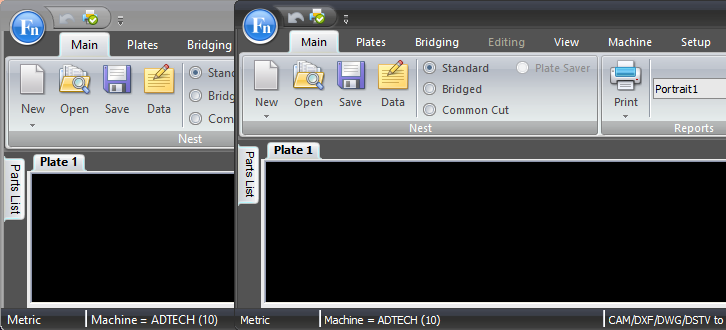 |
|
|
Xtreme SuitePro (ActiveX) version 24.3.0
Windows 7 (64bit) Visual Basic 6.0 SP6 |
|
 |
|
|
Post Reply
|
|
 Tweet
Tweet
|
| Forum Jump | Forum Permissions You cannot post new topics in this forum You cannot reply to topics in this forum You cannot delete your posts in this forum You cannot edit your posts in this forum You cannot create polls in this forum You cannot vote in polls in this forum |


 Topic Options