
|
How to change default "up/dwn" arow in listbox? |
Post Reply 
|
| Author | |
shanmuganathan 
Groupie 

Joined: 01 December 2006 Status: Offline Points: 49 |
 Post Options Post Options
 Thanks(0) Thanks(0)
 Quote Reply Quote Reply
 Topic: How to change default "up/dwn" arow in listbox? Topic: How to change default "up/dwn" arow in listbox?Posted: 25 July 2011 at 9:59am |
|
Hi All,
Recently i used CXTEditListBox for one of my control and set the header for the listbox using "SetListEditStyle" functionality. It worked fine as per my requirements. But i would like to change the default icons provided for "Up/Down" arrow button. Please let me know how can i achieve this ? 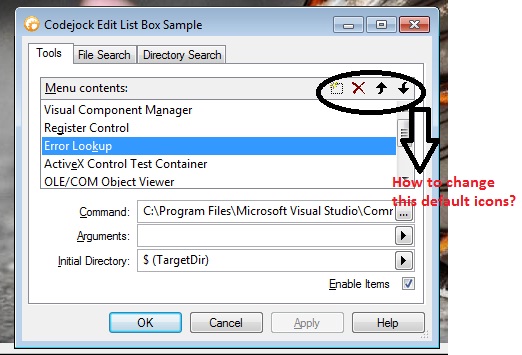 Thanks in Advance. |
|
 |
|
|
Oleg
Senior Member 
Joined: 21 May 2003 Location: United States Status: Offline Points: 11234 |
Post Options
Thanks(0)
Quote Reply
Posted: 26 July 2011 at 2:07pm |
|
Hi,
you can replace Source\Controls\res\btn_listedit.bmp file and rebuild toolkit.
|
|
|
Oleg, Support Team
CODEJOCK SOFTWARE SOLUTIONS |
|
|
|
|
shanmuganathan
Groupie
Joined: 01 December 2006 Status: Offline Points: 49 |
Post Options
Thanks(0)
Quote Reply
Posted: 26 July 2011 at 2:25pm |
|
Hi,
1) I am not able to find any "bmp" file with that name in the path you mentioned. 2) I would like to know how to change this icon in my application rather than in the toolkit. Please explain in detail ! Thanks in Advance. |
|
|
|
|
Post Reply
|
|
 Tweet
Tweet
|
| Forum Jump | Forum Permissions You cannot post new topics in this forum You cannot reply to topics in this forum You cannot delete your posts in this forum You cannot edit your posts in this forum You cannot create polls in this forum You cannot vote in polls in this forum |


 Topic Options