
|
column width in multischedule |
Post Reply 
|
| Author | |
Marc 
Newbie 
Joined: 12 March 2009 Status: Offline Points: 9 |
 Post Options Post Options
 Thanks(0) Thanks(0)
 Quote Reply Quote Reply
 Topic: column width in multischedule Topic: column width in multischedulePosted: 08 June 2011 at 10:02am |
|
Hello,
I want to use the multischedule-mode. In the "normal" mode the column width will be set automatically, so that I see all days at the same time. In multischedule-mode the column width is statically, so that I have a scrollbar. What must I
do, to change the column width in multi-schedule mode? Best
regards normal view: 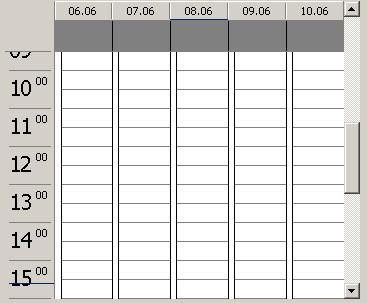 the same in multischedule-view: 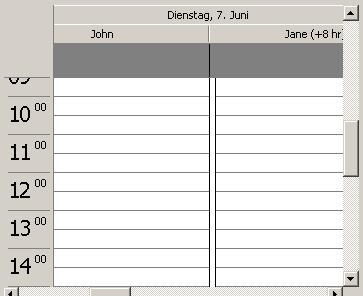 |
|
 |
|
|
Marc
Newbie
Joined: 12 March 2009 Status: Offline Points: 9 |
Post Options
Thanks(0)
Quote Reply
Posted: 29 June 2011 at 2:44am |
|
Is there really now way to change the column width by using multiple schedule?
Best regards Marc |
|
|
|
|
SuperMario
Senior Member 

Joined: 14 February 2004 Status: Offline Points: 18057 |
Post Options
Thanks(0)
Quote Reply
Posted: 06 July 2011 at 1:46pm |
|
there is no setting for this. write to support if you want us to add it.
|
|
|
|
|
SuperMario
Senior Member
Joined: 14 February 2004 Status: Offline Points: 18057 |
Post Options
Thanks(0)
Quote Reply
Posted: 25 March 2013 at 1:04pm |
|
You can now control this behavior by setting minimal column width (for example 0 for automatic mode): CalendarControl.DayView.MinColumnWidth = 0 CalendarControl.Populate
|
|
|
|
|
Marc
Newbie
Joined: 12 March 2009 Status: Offline Points: 9 |
Post Options
Thanks(0)
Quote Reply
Posted: 26 March 2013 at 4:54am |
|
It is working.
Thank you. |
|
|
|
|
Post Reply
|
|
 Tweet
Tweet
|
| Forum Jump | Forum Permissions You cannot post new topics in this forum You cannot reply to topics in this forum You cannot delete your posts in this forum You cannot edit your posts in this forum You cannot create polls in this forum You cannot vote in polls in this forum |


 Topic Options