
|
Caption Alignment |
Post Reply 
|
| Author | ||
Albert1 
Groupie 

Joined: 01 February 2007 Location: Italy Status: Offline Points: 66 |
 Post Options  Thanks(0)  Quote Reply  Topic: Caption Alignment Posted: 15 September 2010 at 9:46am |
|
|
Using this code:
I get this result:
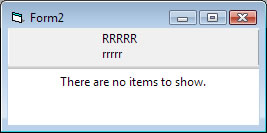 The second row of the caption is not correctly aligned. To reach the correct alignment I need to use markup:
By using markup I can get what I desire:
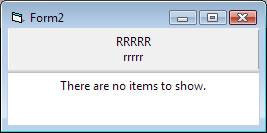 This way I need to setup in advance the headerheight (I did not find the header-markup-autosize. If the user uses different chars, what should I do?)
Is there a way to center align the caption WITHOUT use markup?
Thank you
|
||
|
Product: Xtreme SuitePro (ActiveX) version 13.4.1 / 16.3.0
Platform: Windows Vista (32bit) - SP 2 Language: Visual Basic 6.0 (SP6) |
||
 |
||
|
Aaron
Senior Member 

Joined: 29 January 2008 Status: Offline Points: 2192 |
Post Options
Thanks(0)
Quote Reply
Posted: 17 September 2010 at 5:26am |
|
|
Hi Albert,
I agree, columnheader management is a bit messy. It's not working as should and if you want to create such columnheader like you want, it isn't possible...
To SuperMario: can you please look at this to?
Thanks a lot in advance
|
||
|
Product: Xtreme SuitePro (ActiveX) version 15.0.2
Platform: Windows XP (32bit) - SP 2 Language: Visual Basic 6.0 Zero replies is not an option.... |
||
|
||
|
Post Reply
|
|
| Tweet |
| Forum Jump | Forum Permissions You cannot post new topics in this forum You cannot reply to topics in this forum You cannot delete your posts in this forum You cannot edit your posts in this forum You cannot create polls in this forum You cannot vote in polls in this forum |


 Topic Options