
|
Formextender Region |
Post Reply 
|
| Author | |
Auge_Ohr 
Groupie 
Joined: 20 December 2008 Status: Offline Points: 65 |
 Post Options Post Options
 Thanks(0) Thanks(0)
 Quote Reply Quote Reply
 Topic: Formextender Region Topic: Formextender RegionPosted: 09 March 2009 at 8:39am |
|
hi,
i did play with Formextender like transparency and it work fine. Now i found Property Region "non rectangle region", but i do not understand what it meen. i did setProperty("Region",iPicture) and something happend ... but not what i expect. i did run Popup Control before where i can use a Bitmap and Transparenz of Bitmap to make a "Round" PopUp Control. i try same Bitmap with FormExtender:Region and like to get a Result like Popup Control, but how ? |
|
|
greetings by OHR
Jimmy |
|
 |
|
|
Oleg
Senior Member 
Joined: 21 May 2003 Location: United States Status: Offline Points: 11234 |
Post Options
Thanks(0)
Quote Reply
Posted: 09 March 2009 at 1:25pm |
|
Hi,
Region can be used to set some shape - create bitmap with white and black pixels and set it as region.
|
|
|
Oleg, Support Team
CODEJOCK SOFTWARE SOLUTIONS |
|
|
|
|
Auge_Ohr
Groupie
Joined: 20 December 2008 Status: Offline Points: 65 |
Post Options
Thanks(0)
Quote Reply
Posted: 10 March 2009 at 1:04am |
|
hi,
Thx for Information. it should include in Helpfile :) ok i make a "black hole" on white Background as Bitmap and attache it to my Formexterder Dialog. My Dialog itself hold a color Bitmap on itīs ":drawingArea" 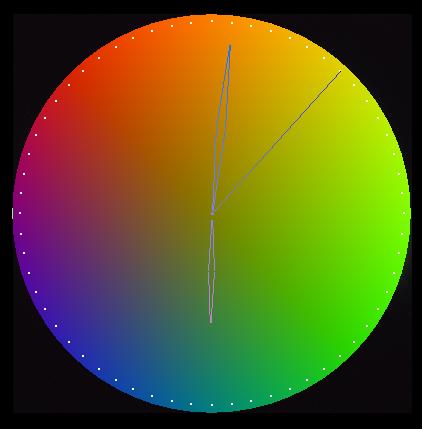 the "Black" Color around the Clock is my Desktop ! the "Black" Color around the Clock is my Desktop !
|
|
|
greetings by OHR
Jimmy |
|
|
|
|
Post Reply
|
|
 Tweet
Tweet
|
| Forum Jump | Forum Permissions You cannot post new topics in this forum You cannot reply to topics in this forum You cannot delete your posts in this forum You cannot edit your posts in this forum You cannot create polls in this forum You cannot vote in polls in this forum |


 Topic Options
 oleg wrote: