
|
How to change the default work day? |
Post Reply 
|
| Author | |
g.novi 
Groupie 
Joined: 27 October 2009 Location: Italy Status: Offline Points: 38 |
 Post Options Post Options
 Thanks(0) Thanks(0)
 Quote Reply Quote Reply
 Topic: How to change the default work day? Topic: How to change the default work day?Posted: 16 April 2011 at 5:59am |
|
Hi,
how to change the default work day?
 Thanks
Gianpiero
|
|
 |
|
|
g.novi
Groupie
Joined: 27 October 2009 Location: Italy Status: Offline Points: 38 |
Post Options
Thanks(0)
Quote Reply
Posted: 19 April 2011 at 10:38am |
|
Someone help me?
Please... ;-)
Gianpiero
|
|
|
|
|
SuperMario
Senior Member 

Joined: 14 February 2004 Status: Offline Points: 18057 |
Post Options
Thanks(0)
Quote Reply
Posted: 19 April 2011 at 12:08pm |
|
what do you mean default work day?
|
|
|
|
|
g.novi
Groupie
Joined: 27 October 2009 Location: Italy Status: Offline Points: 38 |
Post Options
Thanks(0)
Quote Reply
Posted: 19 April 2011 at 12:34pm |
|
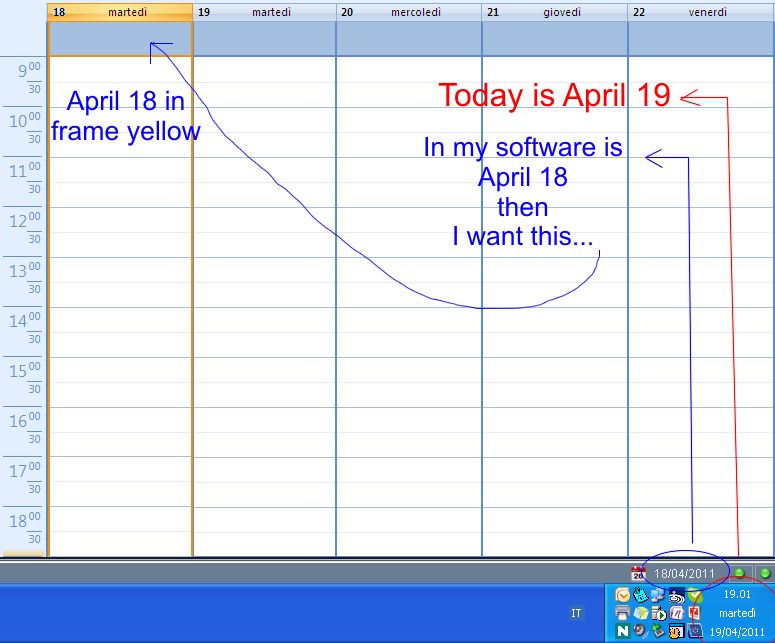
The calendar uses the system date as the date of work (in the yellow frame).
I want it's different from the system date.
How can I do?
Thanks.
Gianpiero
PS: I'm sorry for my bad English.
|
|
|
|
|
SuperMario
Senior Member
Joined: 14 February 2004 Status: Offline Points: 18057 |
Post Options
Thanks(0)
Quote Reply
Posted: 19 April 2011 at 12:40pm |
|
Do you mean you want the calendar to open on some specified date?
wndCalendarControl.Options.WorkWeekMask = xtpCalendarDayMo_Fr wndCalendarControl.Options.FirstDayOfTheWeek = 1 Dim Today As Date Today = Now wndCalendarControl.ViewType = xtpCalendarDayView 'wndCalendarControl.DayView.ShowDays Today - 2, Today + 2 Dim DateMin As Date, DateMax As Date DateMin = #5/10/2011# DateMax = #5/14/2011# wndCalendarControl.DayView.ShowDays DateMin, DateMax wndCalendarControl.DayView.ScrollToWorkDayBegin |
|
|
|
|
g.novi
Groupie
Joined: 27 October 2009 Location: Italy Status: Offline Points: 38 |
Post Options
Thanks(0)
Quote Reply
Posted: 19 April 2011 at 1:35pm |
|
Sorry, I try with another image...
 |
|
|
|
|
g.novi
Groupie
Joined: 27 October 2009 Location: Italy Status: Offline Points: 38 |
Post Options
Thanks(0)
Quote Reply
Posted: 10 May 2011 at 6:36am |
|
No solution for this problem? Please...
|
|
|
|
|
dindo.lales
Groupie
Joined: 01 August 2010 Status: Offline Points: 20 |
Post Options
Thanks(0)
Quote Reply
Posted: 12 May 2011 at 1:53am |
|
I think what he wanted to ask is how to use a different date/time for the calendar rather than the System date (which I believe is currently used by Codejock). Haven't found a solution for this yet.
|
|
|
Product: Xtreme Calendar (ActiveX) version 13.4.0
Platform: Windows 7 Professional (32bit) Language: Powerbuilder 11.5 |
|
|
|
|
g.novi
Groupie
Joined: 27 October 2009 Location: Italy Status: Offline Points: 38 |
Post Options
Thanks(0)
Quote Reply
Posted: 12 May 2011 at 3:01am |
|
So I hope that for the next release will be available!
Do you think I make this recommendation to Codejock?
Thank you.
|
|
|
|
|
dindo.lales
Groupie
Joined: 01 August 2010 Status: Offline Points: 20 |
Post Options
Thanks(0)
Quote Reply
Posted: 18 May 2011 at 9:44pm |
|
Not yet sure if there's already a request for this or the latest version already have it. I only have version 13.4 but looking at their release notes, there's no update for this yet. You can try contact Codejock through their support page.
|
|
|
Product: Xtreme Calendar (ActiveX) version 13.4.0
Platform: Windows 7 Professional (32bit) Language: Powerbuilder 11.5 |
|
|
|
|
Post Reply
|
|
 Tweet
Tweet
|
| Forum Jump | Forum Permissions You cannot post new topics in this forum You cannot reply to topics in this forum You cannot delete your posts in this forum You cannot edit your posts in this forum You cannot create polls in this forum You cannot vote in polls in this forum |


 Topic Options